

Class: Primary One
Term: First Term
Subject: Basic Science and Technology
Curriculum theme: Computer Studies
Previous Lesson: Computer, System Unit
Topic: Functions of alphabetic and Numeric Keys
Content/Learning Area: Identify the Alphabetic and Numeric keys on a keyboard, State the functions of the alphabetic and Numeric keys
Time Allocation: 40 minutes
Performance Objectives
By the end of the lesson, pupils should be able to:
- Cognitive Domain:
1. Identify the alphabetic and numeric keys on a keyboard.
2. Explain the functions of alphabetic keys.
3. Explain the functions of numeric keys.
- Affective Domain:
1. Show interest in learning about keyboard functions.
2. Participate actively in class discussions.
3. Demonstrate a positive attitude towards using computers.
- Psychomotor Domain:
1. Locate and point to alphabetic keys on a keyboard.
2. Locate and point to numeric keys on a keyboard.
3. Practice typing letters and numbers on a keyboard.
- Social Domain:
1. Work cooperatively with peers during activities.
2. Share ideas and knowledge with classmates.
3. Listen attentively to the teacher and peers.
Reference Materials
- 9 – Years Basic Education Curriculum
- Abuja Educational Resource Center Scheme of work
- NAPPS National Unified Scheme of Work
- Relevant textbooks
Instructional Materials
To deliver this lesson,the teacher will use the following materials:
- A computer with a keyboard
- Whiteboard or chart paper
- Markers or pens
- Pictures of keyboards
Rationale for the Lesson
Understanding keyboard functions is crucial for basic computer literacy. This lesson provides a foundation for future computer skills and empowers pupils to interact with technology effectively.
Prerequisite/Previous Knowledge
The teacher will start by asking pupils what they know about computers and keyboards. The teacher will then show a picture of a keyboard and ask pupils to identify familiar keys. This will create excitement and curiosity about the lesson.
Lesson Content
Functions of Alphabetic and Numeric Keys
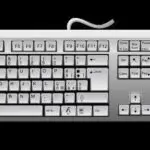
The keyboard is a vital part of a computer, enabling us to input letters, numbers, and symbols. There are two main key types: alphabetic and numeric.
What are Alphabetic Keys?
Alphabetic keys represent the letters of the alphabet (A-Z). their functions include:
The following are functions of alphabetic keys:
- Typing letters to form words like “cat,” “dog,” and “house.”
- Creating sentences to express complete thoughts.
- Writing names of people,places,and things.
- Forming paragraphs to express ideas in detail.
What are Numeric Keys?
Numeric keys represent numbers (0-9). They have several uses:
They are:
- Typing numbers.
- Performing calculations.
- Entering data.
- Writing dates and times.
Othre keys exist beyond alphabetic and numeric keys, such as function keys (for specific tasks) and navigation keys (for screen movement).
Teaching Methods
To deliver this lesson, the teacher will adopt the following methods: Discussion, Presentation, Practical Activity
Instructional Procedures
To deliver this lesson, the teacher will adopt the following steps:
Step 1: Introduction (Set Induction)
Time: 5 minutes
Teaching Skill: Questioning, explaining
Teacher’s Activity: Introduce the topic, review previous knowledge about computers.
Pupils’ Activity: Respond to teacher’s questions, listen attentively.
Step 2: Explanation of Key Concepts
Time: 10 minutes
Teaching Skill: Explaining, illustrating
Teacher’s Activity: Explain the difference between alphabetic and numeric keys, show examples on a keyboard.
Pupils’ activity: Listen attentively,ask clarifying questions.
Step 3: Demonstration/Guided Practice
Time: 10 minutes
Teaching Skill: Demonstrating, guiding
Teacher’s Activity: Demonstrate typing letters and numbers on the keyboard, guide pupils in practicing.
Pupils’ Activity: Observe the demonstration, practice typing under teacher’s guidance.
Step 4: Self-reliant Practice
Time: 5 minutes
Teaching Skill: Monitoring, assisting
Teacher’s Activity: Supervise pupils as they practice typing independently.
Pupils’ Activity: Practice typing letters and numbers independently.
Step 5: Note-Taking
Time: 5 minutes
Teaching Skill: Guiding, summarizing
Teacher’s Activity: Guide pupils in summarizing key concepts in their notebooks.
Pupils’ Activity: Write down key points and examples.
Step 6: Evaluation/Review
Time: 5 minutes
Teaching Skill: Questioning, assessing
Teacher’s Activity: ask evaluation questions to assess understanding.
Pupils’ Activity: Answer evaluation questions.
Objective-aligned checks:
- Identify the alphabetic and numeric keys on a keyboard.
- Explain the functions of alphabetic keys.
- Explain the functions of numeric keys.
Step 7: Conclusion
Time: 2 minutes
Teaching Skill: Summarizing,reinforcing
Teacher’s Activity: Summarize the lesson and encourage further practice.
Pupils’ Activity: Listen to the summary and ask any remaining questions.
Lesson Keywords
- Alphabetic Keys – Keys representing letters of the alphabet (A-Z)
- Numeric Keys – Keys representing numbers (0-9)
- Keyboard – An input device used to type letters, numbers, and symbols into a computer
Lesson Evaluation
To evaluate the learning, the teacher asks pupils to:
- What are the main uses of alphabetic keys?
- How are numeric keys helpful when using a computer?
- Give three examples of words you can type using alphabetic keys.
- Give three examples of numbers you can type using numeric keys.
- Name some keys on a keyboard besides alphabetic and numeric keys.
assignment/Homework
- practice typing your name and address using the alphabetic and numeric keys.
- Draw a keyboard and label the alphabetic and numeric keys.
- Write a short paragraph about why it is important to learn about keyboard functions.
Differentiation
- for slower learners: Provide one-on-one assistance and use simpler examples.
- For advanced learners: Encourage them to explore additional keyboard functions and features.
- For visual/auditory/kinesthetic learners: Use visual aids, verbal explanations, and hands-on activities to cater to different learning styles.
Note for Teachers
Ensure that pupils have access to a keyboard for practice. Provide clear and concise explanations, and encourage active participation from all pupils. Monitor pupils’ progress and provide feedback as needed.


Community Join the conversation Open discussion +