

Class: Junior Secondary School 1 (JSS1, JSS 1)
Term: 2nd Term
Week: 9 & 10
Age: 12 years
Duration: 45 minutes
Subject: Basic Science And Technology
Curriculum Theme: Computer Studies
Previous Lesson:
Topic: The Keyboard and Its Sections
Subject Matter: Definition of keyboard, Types of keyboard: Standard keyboard, Enhanced keyboard, Sections of the keyboard
Specific Objectives
By the end of the lesson, pupils should be able to:
- Cognitive Domain:
(a) Identify the types of computer keyboards.
(b) Describe the different sections of the computer keyboard and their functions. - Affective Domain:
(a) Appreciate the importance of learning how to use the keyboard effectively. - Psychomotor Domain:
(a) Demonstrate correct finger placement on the keyboard.
(b) Practice typing using various keys from each section of the keyboard. - Social Domain:
(a) Work cooperatively in pairs or groups to identify and label keyboard sections.
Reference Materials
The following resources were used in planning this lesson:
- 9 Years Basic Education Curriculum
- Lagos State Unified Scheme of work for Junior Secondary Schools
- Wikipedia – Computer keyboard
- Relevant Textbooks
Instructional Materials
The teacher will teach this lesson with the aid of:
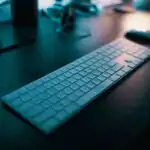
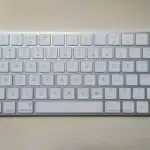
- A real computer keyboard
- Chart showing labelled parts of a keyboard
- Poster of different types of keyboards
- Projector or laptop for demonstration
- Marker and board
Rationale for the Lesson
This lesson helps pupils understand the types and sections of a computer keyboard, improving their ability to use computers efficiently for typing and data input.
Prerequisite/Previous Knowledge
Pupils have previously learned about the basic parts of a computer system, including the monitor, CPU, and keyboard as an input device.
Lesson Content/Board Summary
The Keyboard and Its Sections
Definition of Keyboard
A keyboard is an input device used to type letters, numbers, and symbols into the computer. It allows the user to communicate instructions to the computer.
Types of Keyboard
There are different types of computer keyboards based on design and features.
The following are the types of keyboards:
- Standard Keyboard: This type of keyboard has about 101 keys. It includes all the basic keys such as letters, numbers, function keys, and control keys.
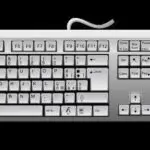
- Enhanced Keyboard: This keyboard has more than 101 keys, often about 104 or more. It includes additional keys like multimedia and internet control keys for modern computers.
Sections of the Keyboard
A computer keyboard is divided into several sections, each serving a special purpose.
The following are the main sections of the keyboard:
- Alphabetic (Typing) Section: This is the main area of the keyboard that contains letters A–Z, numbers 0–9, and punctuation marks. It is similar to a typewriter.
- Function Keys Section: This section contains keys labeled F1 to F12 located at the top of the keyboard. These keys perform special functions depending on the software being used.
- Numeric Keypad Section: Found on the right side of the keyboard, this section has numbers 0–9 and mathematical symbols. It is mainly used for calculations and entering numbers quickly.
- Control Keys Section: This section contains keys such as Ctrl, Alt, Esc, Shift, and Windows key, which are used in combination with other keys to perform specific tasks.
- Navigation (Cursor Control) Keys Section: This section includes the arrow keys and other keys like Home, End, Page Up, and Page Down used to move the cursor around the screen.
- Special Keys Section: These include keys such as Enter, Backspace, Spacebar, Tab, and Caps Lock used for editing, spacing, and formatting during typing.
Teaching Methods/Instructional Techniques:
Lecture, Discussion, Explanation, Demonstration, Group Work, Question and Answer, Visual Aids
Instructional Procedures
To deliver this lesson, the teacher will adopt the following steps:
Step 1: Introduction
Time: 5 minutes
Teaching Skill: Set Induction
Teacher’s Activity: Teacher displays a keyboard and asks pupils to identify what it is and how it is used.
Pupils’ Activity: Pupils respond by describing their knowledge of a keyboard.
Learning Point: Pupils become familiar with the lesson topic and recall prior knowledge of computer parts.
Step 2: Types of Keyboard
Time: 10 minutes
Teaching Skill: Explanation
Teacher’s Activity: Teacher explains the types of keyboard and highlights the differences between standard and enhanced keyboards using visuals.
Pupils’ Activity: Pupils listen attentively and observe the keyboards shown.
Learning Point: Pupils understand the different types of computer keyboards.
Step 3: Sections of the Keyboard
Time: 15 minutes
Teaching Skill: Demonstration
Teacher’s Activity: Teacher points to each section of the keyboard on a real keyboard or chart, explaining its function.
Pupils’ Activity: Pupils follow along and identify each section as the teacher demonstrates.
Learning Point: Pupils can recognize and describe the main sections of a computer keyboard.
Step 4: Practical Demonstration
Time: 8 minutes
Teaching Skill: Practice
Teacher’s Activity: Teacher guides pupils to place their fingers correctly on the keyboard and type sample letters or numbers from each section.
Pupils’ Activity: Pupils practice typing using the keyboard.
Learning Point: Pupils demonstrate proper keyboard use and finger placement.
Step 5: Note-Taking
Time: 3 minutes
Teaching Skill: Reinforcement
Teacher’s Activity: Teacher dictates or writes the board summary for pupils to copy.
Pupils’ Activity: Pupils write the notes neatly in their exercise books.
Learning Point: Pupils have complete notes for future reference.
Step 6: Evaluation/Review
Time: 3 minutes
Teaching Skill: Questioning
Teacher’s Activity: The teacher evaluates the learning by asking the following questions:
- Mention two types of keyboards.
- List four sections of a computer keyboard.
- What is the function of the numeric keypad section?
Pupils’ Activity: Pupils answer the questions orally.
Learning Point: Pupils demonstrate understanding of the types and sections of the keyboard.
Step 7: Conclusion
Time: 1 minute
Teaching Skill: Reinforcement
Teacher’s Activity: Teacher summarizes the lesson, emphasizing the importance of knowing keyboard sections for efficient computer use.
Pupils’ Activity: Pupils listen and ask questions where necessary.
Learning Point: Pupils appreciate the relevance of learning the parts of the keyboard.
Home Task: Record two correct examples of The Keyboard and Its Sections from the lesson or home environment and explain each in your own words.
Lesson Keywords
- Keyboard – input device used to type into the computer
- Function Keys – keys that perform special tasks (F1–F12)
- Numeric Keypad – part of the keyboard for numbers and calculations
- Control Keys – keys used with others to perform special operations
- Cursor Keys – keys used to move the pointer on the screen
Differentiation
Teacher provides simpler explanations and extra time for slower learners while advanced pupils can demonstrate typing using each section of the keyboard.
Note for teachers using this lesson plan
Ensure pupils handle the keyboard carefully during demonstrations. Reinforce correct finger placement and posture during typing practice.
Community Join the conversation Open discussion +