

Class: Primary One
Term: Second Term
Subject: Basic Science and Technology
curriculum theme: Computer Studies
Previous Lesson: Uses of Computer in the Bank
Topic: Drawing of computer Parts
Content/Learning Area: What is a Computer?, Parts of a computer, Drawing and Coloring
Time Allocation: 40 minutes
Performance Objectives
By the end of the lesson, pupils should be able to:
- Cognitive Domain:
1. Identify the main parts of a computer.2. Describe the function of at least three computer parts.3.Explain the importance of neat coloring.
- Affective Domain:
1. Show interest in learning about computers.
2. appreciate the importance of neat work.
3. Develop confidence in drawing and coloring skills.
- Psychomotor Domain:
1. Draw simple shapes (squares, circles, triangles).
2. Draw at least three parts of a computer.
3.Color drawings neatly and appropriately.
- Social Domain:
1. Work cooperatively with classmates.2. Ask questions when needed.
3. Share learning materials respectfully.
Reference Materials
- 9 – Years Basic Education Curriculum
- Abuja Educational Resource Center Scheme of Work
- NAPPS National Unified Scheme of Work
- Relevant Textbooks
Instructional Materials
To deliver this lesson, the teacher will use the following materials:
- Whiteboard or chart paper
- Markers or crayons
- Drawing paper
- Colored pencils or crayons
- Pictures of computer parts
Rationale for the Lesson
This lesson introduces pupils to the basic parts of a computer, fostering early technological literacy. Understanding computer components is crucial for future learning and navigating a technology-driven world.
Prerequisite/Previous Knowledge
Pupils have basic knowledge of common objects and tools.
Lesson Content
What is a Computer?
A computer is an electronic device that can store, process, and retrieve information. ItS a powerful tool used for interaction, entertainment, education, and business. Learn more about computers here.
Parts of a Computer
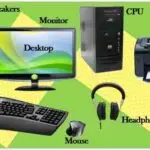
The computer is made up of different parts that work together to perform tasks. These parts include:
The following are examples of computer parts:
- Monitor: The screen displaying information; like a TV for your computer.
- Keyboard: Used to type information; like a typewriter for your computer.
- Mouse: A pointing device controlling the cursor on the screen; like a remote control.
- CPU (Central Processing Unit): The brain of the computer, processing all information.
- Printer: Used to print documents and images on paper.
- Speakers: used to output sound from the computer.
- Webcam: A camera used for video conferencing and recording videos.
Drawing and Coloring
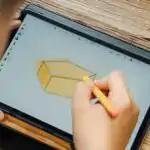
We will learn to draw and color computer parts.We’ll start with simple shapes (squares, circles, triangles) to create the parts. After drawing,we’ll color them using different colors to make the drawings captivating and realistic.
Teaching Methods
To deliver this lesson, the teacher will adopt the following methods: Exhibition, Explanation, Question and answer, and Guided Practise.
Instructional Procedures
To deliver this lesson,the teacher will adopt the following steps:
Step 1: Introduction (Set Induction)
Time: 5 minutes
Teaching Skill: Questioning,Discussion
Teacher’s Activity: Ask pupils what they know about computers. Show pictures of computers and their parts.
Pupils’ Activity: Respond to teacher’s questions, observe pictures.
Step 2: Explanation of Key Concepts
Time: 10 minutes
Teaching Skill: Explanation, Definition
Teacher’s activity: Explain what a computer is and its main parts (monitor, keyboard, mouse, CPU).Pupils’ Activity: Listen attentively, ask clarifying questions.
Step 3: Presentation/Guided Practice
Time: 10 minutes
Teaching Skill: Demonstration, Modeling
Teacher’s Activity: Demonstrate how to draw simple shapes and use them to draw computer parts.Pupils’ activity: Observe the demonstration, try drawing along with the teacher.
Step 4: Autonomous Practice
Time: 10 minutes
Teaching Skill: Monitoring, Feedback
Teacher’s Activity: Supervise pupils as they draw and color computer parts independently.
Pupils’ Activity: Draw and color computer parts, ask for help if needed.
Step 5: Note-Taking
Time: 2 minutes
Teaching Skill: Note-Taking
Teacher’s Activity: Guide pupils to write down key points about computer parts and their functions.
Pupils’ Activity: Write down key points in their notebooks.
Step 6: Evaluation/Review
Time: 3 minutes
teaching Skill: Questioning, Feedback
Teacher’s Activity: Ask evaluation questions to assess understanding.
Pupils’ Activity: Answer evaluation questions.
Objective-aligned checks:
- Identify the main parts of a computer.
- Describe the function of at least three computer parts.
- Explain the importance of neat coloring.
Step 7: Conclusion
Time: 2 minutes
Teaching Skill: summarizing, Encouragement
teacher’s Activity: Summarize the lesson and encourage pupils to practice drawing and coloring.Pupils’ Activity: Listen to the summary and ask any remaining questions.
Lesson Keywords
- Computer – An electronic device that processes data.
- monitor – The screen that displays information.
- Keyboard – A device used to input text and commands.
- Mouse – A pointing device used to control the cursor.
- CPU – The central processing unit, the brain of the computer.
- Drawing – Creating images using lines and shapes.
- Coloring – Adding colors to drawings to make them more appealing.
Lesson Evaluation
To evaluate the learning,the teacher asks pupils to:
- What are the different parts of a computer?
- Can you draw and name at least three computer parts?
- Why is it critically important to color neatly and use appropriate colors?
- What is the function of the monitor?
- What is the function of the keyboard?
Assignment/Homework
- Draw and color three different computer parts.
- write down the functions of each computer part you drew.
- Ask your parents or guardians about other uses of computers at home.
Differentiation
- For slower learners: Provide one-on-one assistance and simpler drawing tasks.
- For advanced learners: Challenge them to draw additional computer parts or create a more detailed drawing.
- For visual/auditory/kinesthetic learners: Use visual aids, verbal explanations, and hands-on activities to cater to different learning styles.
Note for Teachers
Ensure that all pupils have access to the necessary materials and provide ample encouragement and positive feedback throughout the lesson. Adjust the pace of the lesson to suit the needs of the pupils.

Community Join the conversation Open discussion +