

class: Primary Three
Term: First term
Subject: Basic Science and Technology
Curriculum Theme: Computer Studies
Previous Lesson:
Topic: Different Types of Keyboards
Content/Learning Area: Types of Keyboards,Identifying Keys,Key Arrangements
Time Allocation: 40 minutes
Performance Objectives
By the end of the lesson,pupils should be able to:
- Cognitive Domain:
– Mention different types of keyboards.
– Identify different arrangements of keys.
– Mention the different keys on the keyboard, including alphanumeric keys, function keys, numeric keypad, system keys, and navigation keys.
- Affective Domain:
– Show interest in learning about different keyboard types.
- Psychomotor domain:
– Demonstrate the location of different key types on a keyboard.
- Social Domain:
– Participate actively in class discussions.
Reference Materials
- 9 – years Basic Education Curriculum
- Abuja Educational Resource Center Scheme of Work
- NAPPS National Unified Scheme of Work
- Online details
- Relevant Textbooks
Instructional Materials
to deliver this lesson, the teacher will employ the help of the following materials:
- Whiteboard or chart
- Markers or pens
- Pictures of different keyboard types
- A sample keyboard (if available)
Rationale for the Lesson
Understanding different keyboard types and key arrangements is crucial for efficient computer use. This lesson lays the foundation for future lessons on computer skills and promotes digital literacy.
Prerequisite/previous Knowledge
Pupils are familiar with computer keyboards and mice.
Lesson Content
Types of Keyboards
Keyboards come in various forms, each designed for specific purposes and user preferences.
The following are examples of types of keyboards:
- QWERTY Keyboard: The most common type, named after its top row keys. Used in most computers and laptops.
- Dvorak Keyboard: Designed for efficient typing, with frequently used letters closer to the home row. Less common than QWERTY.
- Ergonomic Keyboard: Reduces wrist and hand strain, often with a split design or curved keys.
- Gaming Keyboard: Features extra keys, customizable lighting, and faster response times for gamers.
- Virtual keyboard: A keyboard displayed on a screen, used on touchscreens or devices without physical keyboards.
- Mechanical Keyboard: Uses individual mechanical switches for each key, providing tactile feedback and durability.
- Wireless Keyboard: Connects to a computer via Bluetooth or a USB receiver, offering freedom of movement.
Identifying Keys
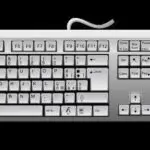
keyboards have different types of keys that serve various functions.
Thes include:
- Alphanumeric Keys: Letters, numbers, and punctuation marks.
- Function Keys: Located at the top, used for tasks like printing or saving files.
- Numeric Keypad: A separate section on the right for fast number entry.
- System Keys: For system tasks like switching windows or restarting.
- Navigation Keys: Move the cursor, including arrow keys, Page up, and Page Down.
- Special Keys: Perform specific actions, such as the space bar, Enter key, and Shift key.
- modifier Keys: Used in combination with other keys to perform special functions, such as Ctrl, Alt, and Shift.
- Command Keys: Specific to certain operating systems, such as the Windows key or the Command key on macOS.
Key Arrangements
Key arrangements vary depending on keyboard type and use. QWERTY is most common, but others like AZERTY and DVORAK exist. Arrangement affects typing speed and efficiency.
Teaching Methods
To deliver this lesson, the teacher will adopt the following methods: Discussion, question and answer, Visual aids
Instructional procedures
to deliver this lesson, the teacher will adopt the following steps:
Step 1: Introduction
Time: 5 minutes
Teaching Skill: Set Induction
Teacher’s Activity: Review previous lesson, introduce the topic of different keyboard types.
Pupils’ Activity: Answer questions, listen attentively.
Step 2: Clarification of Key Concepts
Time: 15 minutes
Teaching Skill: explaining, demonstrating
teacher’s Activity: Explain the different types of keyboards (QWERTY, Dvorak, Ergonomic, Gaming, Virtual) using pictures and examples.
Pupils’ Activity: Listen, observe, ask questions.
Step 3: Presentation/Guided Practice
Time: 10 minutes
Teaching Skill: Demonstrating, guiding
Teacher’s Activity: show examples of different key arrangements and functions (alphanumeric, function, numeric keypad, system, navigation, special keys).
Pupils’ Activity: Observe, participate in identifying keys on a sample keyboard (if available).
step 4: Autonomous Practice
Time: 5 minutes
teaching Skill: Monitoring, guiding
Teacher’s Activity: Pupils work individually to identify key types on a picture of a keyboard.
Pupils’ Activity: Identify key types on a picture of a keyboard.
Step 5: Note-Taking
Time: 2 minutes
Teaching Skill: Guiding
Teacher’s Activity: Guide pupils in taking notes on the main points of the lesson.
Pupils’ Activity: Take notes.
Step 6: Evaluation/Review
Time: 3 minutes
Teaching skill: Questioning
Teacher’s Activity: Ask evaluation questions.
Pupils’ Activity: Answer evaluation questions.
Step 7: Conclusion
Time: 2 minutes
Teaching Skill: Summarizing
Teacher’s Activity: Summarize the main points about different keyboard types and key arrangements. Assign a short activity where pupils draw and label the different parts of a keyboard.
pupils’ Activity: Listen to the summary and receive assignment instructions.
Lesson Keywords
- QWERTY – The most common keyboard layout.
- Ergonomic – Designed to reduce strain and improve comfort.
- Alphanumeric – Keys representing letters and numbers.
- Function Keys – Keys that perform specific functions.
- Navigation Keys – Keys used to move around a document or screen.
Lesson Evaluation
To evaluate the learning,the teacher asks pupils to:
- What are two types of computer keyboards?
- What are some of the different groups of keys found on a keyboard?
- Why is it significant to know the arrangement of keys on a keyboard?
- What are some of the features of a gaming keyboard?
- What is a virtual keyboard and when is it used?
Assignment/homework
- Draw and label the different parts of a keyboard.
- Research and write down three advantages of using an ergonomic keyboard.
- List five functions of the function keys on a keyboard.
Differentiation
- for slower learners: Provide one-on-one assistance and use simpler language.
- For advanced learners: Encourage them to research other keyboard layouts and their history.
- For visual/auditory/kinesthetic learners: Use visual aids, verbal explanations, and hands-on activities to cater to different learning styles.
Note for Teachers
Ensure to have a variety of keyboard examples or images available. Encourage active participation by allowing pupils to physically interact with a keyboard if possible. Adjust the pace of the lesson based on pupils’ understanding and engagement.



Community Join the conversation Open discussion +