

Class: Primary Three
Term: Third Term
Subject: Basic Science and Technology
Curriculum Theme: Computer Studies
Previous Lesson: Meaning Of Storage Devices
Topic: Types and uses of Storage devices
content/learning Area: Identifying and listing five types of storage devices, Showing interest in discussing the uses of different storage devices, Demonstrating how to handle and use a USB flash drive, Collaborating with classmates to categorize different storage devices
Time Allocation: 40 minutes
Performance Objectives
By the end of the lesson, pupils should be able to:
- Cognitive Domain:
1.identify and list five types of storage devices.
2. Explain the uses of different storage devices.
- Affective Domain:
1. Show interest in discussing the uses of different storage devices.
- Psychomotor Domain:
1. Demonstrate how to handle and use a USB flash drive.
- Social Domain:
1. Collaborate with classmates to categorize different storage devices.
Reference Materials
- 9 – Years Basic Education Curriculum
- Abuja Educational Resource Center Scheme of Work
- NAPPS National unified Scheme of Work
- Relevant Textbooks
Instructional Materials
To deliver this lesson, the teacher will use the following materials:
- whiteboard or chart
- Markers or pens
- USB flash drive
- Pictures or diagrams of different storage devices
Rationale for the Lesson
Understanding different storage devices is crucial for pupils’ digital literacy. This lesson provides a foundation for future learning in computer studies and prepares them for using technology effectively in their daily lives.
Prerequisite/Previous Knowledge
the teacher will start by asking pupils what they already know about storage devices.A brief review of the previous lesson on storage devices will be conducted.
Lesson Content
types and Uses of Storage Devices
Storage devices are important parts of a computer that store data and information. Different types of storage devices are used for various purposes.
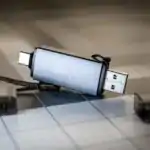
USB Flash Drive
A small, portable device used for storing and transferring files. You can use it to save your school projects, music, or even movies and carry them around easily.
CD (Compact Disc)
Used for storing music, videos, and data files. Remember those old music CDs? They used to be very popular!
External hard drive
A large storage device with a lot of space, used for backing up critically important files and storing large amounts of data. Imagine having a whole library of books on your computer; thatS what an external hard drive can do!
Memory Card
Used in cameras, phones, and other portable devices to store photos, videos, and other files. This is how you keep all your amazing pictures and videos safe!
Cloud Storage
An online storage service that allows you to save files on the internet and access them from any device. It’s like having a digital locker in the sky where you can store your files!
Teaching Methods
To deliver this lesson, the teacher will adopt the following methods: Discussion, Exhibition, Group work
Instructional Procedures
To deliver this lesson, the teacher will adopt the following steps:
Step 1: Introduction (Set Induction)
Time: 5 minutes
Teaching Skill: Questioning, explaining
Teacher’s Activity: Briefly review the previous lesson on storage devices. Introduce the topic of different types of storage devices and their uses.
Pupils’ Activity: Participate in the review and listen attentively to the introduction.
Step 2: Explanation of Key Concepts
Time: 10 minutes
Teaching Skill: explaining, illustrating
Teacher’s Activity: Explain the different types of storage devices (USB flash drive, CD, external hard drive, memory card, cloud storage) and their uses, using visuals and real-life examples.
Pupils’ Activity: Listen attentively, ask questions, and take notes.
Step 3: Demonstration/Guided Practise
Time: 10 minutes
Teaching Skill: Demonstrating, guiding
Teacher’s Activity: Demonstrate how to use a USB flash drive, emphasizing safe handling practices.
Pupils’ Activity: Observe the demonstration and ask questions.
step 4: Autonomous Practice
Time: 5 minutes
Teaching Skill: Monitoring, assisting
Teacher’s Activity: Guide pupils as they work in pairs to categorize different storage devices by their uses.
Pupils’ activity: Work in pairs to categorize storage devices.
Step 5: Note-Taking
Time: 5 minutes
Teaching Skill: Guiding, summarizing
Teacher’s Activity: Summarize the key concepts and guide pupils in taking notes.
Pupils’ Activity: Take notes on the key concepts.
Step 6: Evaluation/Review
Time: 5 minutes
Teaching Skill: Questioning, assessing
Teacher’s Activity: Ask questions to assess pupils’ understanding.
Pupils’ Activity: Answer questions to demonstrate their understanding.
Objective-aligned checks:
- identify and list five types of storage devices.
- Explain the uses of different storage devices.
- Show interest in discussing the uses of different storage devices.
Step 7: Conclusion
Time: 5 minutes
Teaching Skill: Summarizing, concluding
Teacher’s Activity: To conclude the lesson, the teacher will review the key concepts and answer any remaining questions. The teacher will also assign a short homework activity where pupils can research and draw different types of storage devices.
Pupils’ activity: participate in the review and listen attentively to the conclusion.
Lesson Keywords
- Storage Device – A hardware used for storing digital data.
- USB Flash Drive – A portable storage device that uses flash memory.
- CD (Compact Disc) – An optical disc used to store digital data.
- external Hard Drive – A portable hard drive used to store large amounts of data.
- Memory Card – A small storage device used in cameras and phones.
- Cloud Storage – Saving data on remote servers accessible over the internet.
Lesson Evaluation
To evaluate the learning, the teacher asks pupils to:
- Can you list five types of storage devices?
- Can you explain one use for each type of storage device?
- Can you demonstrate how to use a USB flash drive (if one is available)?
- Can you work in pairs to categorize different storage devices by their uses?
Assignment/Homework
- Research and draw different types of storage devices.
- Write a short paragraph on how you use storage devices in your daily life.
- Ask your parents about the types of storage devices they use at home or work.
Differentiation
- For slower learners: Provide one-on-one assistance and use simpler language.
- For advanced learners: Encourage them to research additional types of storage devices and their uses.
- For visual/auditory/kinesthetic learners: Use visual aids, verbal explanations, and hands-on activities to cater to different learning styles.
Note for Teachers
Ensure to bring real examples or pictures of storage devices to class. Encourage pupils to share their experiences with using different storage devices. Provide clear and concise explanations, and allow ample time for questions and practice.



Community Join the conversation Open discussion +