

Class: Primary Three
Term: Third Term
Subject: Basic Science and Technology
Curriculum Theme: Computer Studies
Previous Lesson: Types And Uses Of Storage Devices
Topic: Identification and Description of Floppy Disk
Content/Learning Area: identification of Floppy Disk, Description of Floppy Disk
Time allocation: 40 minutes
Performance Objectives
By the end of the lesson, pupils should be able to:
- Cognitive Domain:
1. Identify a floppy disk and describe its physical characteristics.
2. Explain the past meaning of floppy disks in computing.
- Affective Domain:
1. Show thankfulness for the historical importance of floppy disks.
- Psychomotor Domain:
1. Handle a floppy disk carefully (if available).
- Social Domain:
1. Participate actively in class discussions.
Reference Materials
- 9 – Years Basic Education Curriculum
- Abuja Educational Resource Center scheme of Work
- NAPPS national Unified scheme of Work
- Relevant Textbooks
instructional Materials
To deliver this lesson, the teacher will use the following materials:
- A real floppy disk (if available)
- Pictures of floppy disks
- Whiteboard or chart paper
- Markers
Rationale for the Lesson
Understanding the floppy disk provides context for the evolution of technology. It helps pupils appreciate how data storage has advanced and prepares them for learning about more modern storage methods.
Prerequisite/Previous Knowledge
The teacher will begin by asking pupils what thay remember about storage devices from the previous lesson.A brief review will be conducted, followed by introducing the topic of floppy disks as an older type of storage device.
lesson Content
Identification and Description of Floppy Disk
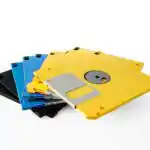
A floppy disk is an older type of data storage device used in the past. It’s a thin, flexible magnetic disk inside a square or rectangular plastic case.Common sizes were 3.5-inch and 5.25-inch.
Identification of Floppy Disk
Floppy disks have distinct characteristics that help in their recognition.
The following are:
- Thin and flexible.
- Enclosed in a plastic shell.
- Has a metal shutter protecting the magnetic surface.
- Common sizes are 3.5-inch and 5.25-inch.
- often labeled with storage capacity (e.g., 1.44MB).
- May have a wriet-protect notch to prevent data from being overwritten.
Description of Floppy Disk
Floppy disks were essential for data storage and transfer in the past.They are:
- Used to store and transfer data between computers.
- Inserted into a floppy disk drive to read or write data.
- Had limited storage (1.2 MB to 1.44 MB) compared to modern storage devices.
- Popular from the late 1970s to the early 2000s.
- Prone to damage from dust, heat, and magnetic fields.
- Slower in data access compared to modern storage options like USB drives.
Teaching Methods
To deliver this lesson, the teacher will adopt the following methods: Discussion, Question and Answer, Show and Tell (if a floppy disk is available)
Instructional Procedures
To deliver this lesson, the teacher will adopt the following steps:
Step 1: Introduction (Set Induction)
Time: 5 minutes
Teaching Skill: Set Induction
Teacher’s Activity: Review previous lesson on storage devices. Introduce floppy disks as a historical storage device.
Pupils’ Activity: Participate in review and listen attentively to the introduction.
Step 2: Description of Key Concepts
Time: 15 minutes
Teaching Skill: Clarification
Teacher’s activity: Explain what a floppy disk is, its physical characteristics, and its uses.
Pupils’ Activity: Listen attentively and ask clarifying questions.
Step 3: Exhibition/Guided Practice
Time: 10 minutes
Teaching Skill: Demonstration
Teacher’s Activity: Show a real floppy disk (if available) and point out its key features. Show pictures of floppy disks.
Pupils’ Activity: Observe the floppy disk and participate in identifying its features.
Step 4: Autonomous Practice
Time: 5 minutes
Teaching Skill: Guided Practice
Teacher’s Activity: Ask pupils to describe a floppy disk based on what they have learned.
Pupils’ Activity: Describe a floppy disk based on their understanding.
Step 5: Note-Taking
Time: 2 minutes
Teaching Skill: Note-Taking
Teacher’s Activity: Guide pupils in taking notes on key features and uses of floppy disks.
Pupils’ Activity: Take notes on key points.
Step 6: Evaluation/Review
Time: 3 minutes
Teaching skill: Questioning
Teacher’s Activity: Ask review questions to assess understanding.
Pupils’ Activity: Answer review questions.
Objective-aligned checks:
- Identify a floppy disk and describe its physical characteristics.
- Explain the past meaning of floppy disks in computing.
- Show thankfulness for the historical importance of floppy disks.
Step 7: Conclusion
Time: 2 minutes
Teaching Skill: Summarizing
Teacher’s Activity: Summarize the key features and uses of floppy disks,emphasizing their historical importance. Assign homework.
Pupils’ Activity: Listen to the summary and note the homework assignment.
Lesson Keywords
- Floppy Disk – An older type of data storage device.
- Storage Device – A device used to store digital data.
- Magnetic disk – A storage medium that uses magnetic fields to store data.
- Data Transfer – The process of moving data from one location to another.
- Disk Drive – A device that reads and writes data on a disk.
Lesson Evaluation
To evaluate the learning, the teacher asks pupils to:
- What are some physical characteristics of a floppy disk?
- How did people use floppy disks to store and transfer data?
- why are floppy disks historically crucial in computing?
- What are some differences between floppy disks and modern storage devices?
Assignment/Homework
- Draw a floppy disk and label its parts.
- Research and write a short paragraph on how floppy disks were used in the past.
Differentiation
- For slower learners: Provide one-on-one assistance and use simpler language.
- For advanced learners: Encourage them to research further into the history of floppy disks and their impact on technology.
- For visual/auditory/kinesthetic learners: Use visual aids, verbal explanations, and hands-on activities (if a floppy disk is available).
Note for Teachers
Ensure to bring a real floppy disk or clear pictures to aid understanding. Emphasize the historical context and how technology has evolved.


Community Join the conversation Open discussion +