

Class: Primary Three
Term: Second term
Subject: Basic Science and Technology
Curriculum Theme: Computer Studies
Previous Lesson: Output Devices, The Printer
Topic: The System Unit
Content/Learning Area: Defining a system unit, Listing functions of a system unit, Appreciating the importance of a system unit in a computer
Time Allocation: 40 minutes
Performance Objectives
By the end of the lesson, pupils should be able to:
- Cognitive Domain:
1. Define a system unit.2. List five functions of a system unit.
3. Explain the importance of a system unit in a computer.
- Affective Domain:
1. Show recognition for the importance of the system unit.
- Psychomotor Domain:
1. Identify the system unit in a computer.
- Social Domain:
1. Work collaboratively in group activities.
Reference Materials
- 9 – Years Basic education Curriculum
- abuja Educational Resource Center scheme of Work
- NAPPS National Unified Scheme of Work
- Relevant Textbooks
Instructional Materials
To deliver this lesson, the teacher will employ the help of the following materials:
- Whiteboard or chart
- Markers or pens
- Pictures of system units
- A working computer (if possible)
Rationale for the Lesson
Understanding the system unit is crucial for basic computer literacy. This lesson provides a foundation for future learning about computer hardware and software.
Prerequisite/Previous Knowledge
The teacher will start by asking pupils what they know about computers.A brief discussion will follow, leading into the introduction of the system unit as the central part of a computer.
Lesson Content
System Unit
The system unit is the central part of a computer, acting as its brain and coordinating all other parts.
What is a System Unit?
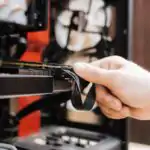
The system unit houses the main components of a computer.These include: motherboard, CPU, RAM, and storage. It’s the box containing essential parts.
Functions of a System Unit
The system unit performs several critical functions that enable a computer to operate effectively. These include:
- Processing Data: Processes details entered (typing, clicking).
- Storage: Stores data, instructions, files, programs, and the operating system.
- Interaction: Allows communication between computer parts (keyboard, mouse, monitor).
- Power Supply: Provides power to all components.
- Control: Controls and manages the computer’s overall function.
- Cooling: Regulates the temperature of internal components to prevent overheating.
- Connectivity: Provides ports for connecting external devices such as printers and USB drives.
Teaching Methods
To deliver this lesson, the teacher will adopt the following methods: Discussion, Question and answer, Visual aids
Instructional Procedures
To deliver this lesson, the teacher will adopt the following steps:
Step 1: Introduction
Time: 5 minutes
Teaching Skill: Set Induction
Teacher’s Activity: Ask pupils what they know about computers. Introduce the topic: “The System Unit.”
Pupils’ Activity: Respond to teacher’s questions and listen attentively.
Step 2: Description of Key Concepts
Time: 15 minutes
Teaching Skill: Explaining
Teacher’s Activity: Explain what a system unit is and its main components using visual aids.
Pupils’ Activity: Listen attentively and ask questions.
Step 3: Presentation/Guided Practise
Time: 10 minutes
Teaching Skill: Demonstrating
Teacher’s Activity: Show pictures of system units and point out key components. If possible, show a real system unit.
pupils’ activity: Observe and participate in discussions.
Step 4: Self-reliant Practice
Time: 5 minutes
Teaching Skill: Monitoring
Teacher’s Activity: Pupils work individually to answer simple questions about the system unit.
Pupils’ Activity: Answer questions independently.
Step 5: Note-Taking
Time: 2 minutes
teaching Skill: Guiding
Teacher’s Activity: Guide pupils in taking notes on key concepts.Pupils’ Activity: Take notes.
Step 6: Evaluation/Review
Time: 3 minutes
Teaching Skill: Questioning
Teacher’s Activity: Ask review questions to assess understanding.
Pupils’ activity: answer review questions.
Objective-aligned checks:
- Define a system unit.
- List five functions of a system unit.
- Explain the importance of a system unit in a computer.
Step 7: Conclusion
Time: 2 minutes
Teaching Skill: Summarizing
Teacher’s Activity: Summarize the key points about the system unit and its importance.
Pupils’ Activity: Listen attentively.
Lesson Keywords
- System Unit – The main part of a computer that houses the CPU, memory, and other components.
- CPU – Central Processing Unit; the brain of the computer.
- RAM – Random Access Memory; temporary storage for data.
- Motherboard – The main circuit board in a computer.
- Storage – Devices like hard drives or SSDs that store data.
Lesson Evaluation
To evaluate the learning, the teacher asks pupils to:
- What is a system unit?
- Name three functions of a system unit.
- Why is the system unit significant?
- Give examples of components inside the system unit.
- How does the system unit help us use computers daily?
Assignment/Homework
- Draw a picture of a system unit and label its main parts.
- List five functions of the system unit and explain each in one sentence.
- Research and write down three different types of storage devices used in a system unit.
Differentiation
- For slower learners: Provide simplified diagrams and one-on-one assistance to explain the functions of the system unit.
- For advanced learners: Encourage them to research additional information about system unit components and their specifications.
- for visual/auditory/kinesthetic learners: Use visual aids, interactive discussions, and hands-on activities to engage different learning styles.
Note for Teachers
Ensure to use real-life examples and relatable scenarios to explain the functions of the system unit. Encourage pupils to ask questions and participate actively in discussions to enhance their understanding.


Community Join the conversation Open discussion +