

Class: Primary Three
Term: Third Term
subject: basic Science and Technology
Curriculum Theme: Computer Studies
Previous Lesson: Do’s And Don’ts Of Using A Disk Drive
Topic: Storage Devices
Content/Learning Area: What are storage devices?, Examples of Storage Devices, Importance of Storage Devices
Time Allocation: 40 minutes
performance Objectives
By the end of the lesson, pupils should be able to:
- Cognitive Domain:
1. Define storage devices and list examples.
2. Identify different storage devices physically or through images.
- Psychomotor Domain:
1. Identify storage devices from real objects or images.
- Affective Domain:
1. Appreciate the importance of storage devices in everyday life.
- Social Domain:
1. Discuss the use of storage devices with classmates.
Reference Materials
- 9 – Years Basic education Curriculum
- Abuja educational Resource Center Scheme of Work
- NAPPS National Unified Scheme of Work
- Relevant Textbooks
Instructional Materials
To deliver this lesson, the teacher will use the following materials:
- Whiteboard or chart
- Markers or pens
- Examples of storage devices (USB drive, CD, etc.)
- Pictures of storage devices
Rationale for the Lesson
Understanding storage devices is crucial for pupils’ digital literacy. This lesson lays the foundation for future lessons on computer technology and its applications in daily life.
Prerequisite/Previous Knowledge
Pupils are familiar with computers and saving files.
Lesson content
What are Storage Devices?
Storage devices are tools or gadgets used to save data or information. They are like special containers for our digital information. When we have something crucial we want to keep, like a photo or a document, we use a storage device to save it so we can use it later.
Examples of Storage Devices
Storage devices come in various forms, each serving the purpose of preserving digital information.
Examples are:
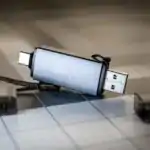
- USB drive: A small, portable device that plugs into a computer to store and transfer files.
- CD: A disc that stores data using a laser.
- Hard drive: A larger storage device inside a computer that holds the operating system and other critically important files.
- Memory Card: A small storage device used in phones and cameras to store pictures and videos.
- External Hard Drive: A portable hard drive used to back up large amounts of data from a computer.
Importance of Storage Devices
Storage devices play a vital role in our digital lives, offering numerous benefits.
They are:
- Save our work: We can save our school projects, drawings, and other critically important documents on storage devices.
- Store our favorite things: We can store photos, music, and videos on storage devices to enjoy later.
- Share information: We can use storage devices to share files with friends and family.
- Backup important data: Storage devices help us create copies of important files in case the original is lost or damaged.
- Organize our files: We can organize our documents, photos, and videos into folders on storage devices for easy access.
Teaching Methods
To deliver this lesson, the teacher will adopt the following methods: Discussion,Demonstration,Question and answer.
Instructional Procedures
To deliver this lesson, the teacher will adopt the following steps:
Step 1: Introduction
Time: 5 minutes
teaching Skill: Questioning
Teacher’s Activity: Asks pupils about how they save their work.
Pupils’ Activity: Respond to the teacher’s questions.
Step 2: Explanation of Key Concepts
Time: 10 minutes
Teaching Skill: Explanation
Teacher’s Activity: Defines storage devices and gives examples.
Pupils’ Activity: Listen attentively and take notes.
Step 3: Demonstration/Guided Practice
Time: 10 minutes
Teaching Skill: Demonstration
Teacher’s Activity: Shows examples of storage devices and explains their uses.
Pupils’ Activity: Observe and ask questions.
Step 4: Self-reliant Practice
Time: 5 minutes
Teaching Skill: Guided Practice
Teacher’s Activity: Asks pupils to identify storage devices from pictures.
Pupils’ Activity: Identify storage devices from pictures.
Step 5: Note-Taking
Time: 5 minutes
Teaching Skill: Note-Taking
teacher’s Activity: Guides pupils in taking notes on key concepts.
Pupils’ Activity: Take notes on key concepts.
Step 6: Evaluation/Review
Time: 5 minutes
Teaching Skill: Questioning
Teacher’s Activity: Asks evaluation questions.Pupils’ Activity: Answer evaluation questions.
Objective-aligned checks:
- Define storage devices and list examples.
- Identify different storage devices physically or through images.
- Identify storage devices from real objects or images.
Step 7: Conclusion
Time: 2 minutes
Teaching Skill: Summarizing
Teacher’s Activity: Summarizes the lesson and assigns homework.
Pupils’ Activity: Listen and note homework.
Lesson Keywords
- Storage Device – A tool used to save data or information.
- USB Drive – A portable device for storing and transferring files.
- CD – A disc that stores data using a laser.
- Hard Drive – A device inside a computer that holds the operating system and files.
Lesson Evaluation
To evaluate the learning, the teacher asks pupils to:
- What is a storage device?
- List three examples of storage devices.
- Why are storage devices important?
- can you identify a storage device from an image or a real object?
assignment/Homework
- Draw and label different types of storage devices.
- List two importance of storage devices.
Differentiation
- For slower learners: provide one-on-one assistance and simplified explanations.
- For advanced learners: Encourage them to research other types of storage devices and their uses.
- For visual/auditory/kinesthetic learners: Use visual aids, verbal explanations, and hands-on activities to cater to different learning styles.
Note for Teachers
Ensure to bring real examples of storage devices to class. Encourage pupils to participate actively by asking questions and sharing their experiences with storage devices.



Community Join the conversation Open discussion +