

Class: Senior Secondary School 1 (SS1, SS 1, SSS1, SSS 1)
Term: 1st Term
Week: 8
Age: 15 years
Duration: 45 minutes
Subject: Computer Studies
Curriculum Theme: Computer Studies
Previous Lesson: Computing Devices III (20th Century to Date).
Topic: Input Devices
Subject Matter: Definition of input devices; types of input devices; keyboard, mouse, scanner, microphone, joystick, card reader, light pen, digital camera
Specific Objectives
By the end of the lesson, pupils should be able to:
Cognitive Domain:
- Define input devices.
- List types of input devices based on the kind of data entered.
- Identify common input devices such as keyboard, mouse, scanner, microphone, joystick, card reader, light pen, and digital camera.
- State basic uses of each input device.
Affective Domain:
- Show interest in proper use and care of input devices.
- Value accuracy and neatness when entering data into a computer system.
Psychomotor Domain:
- Point to and correctly name input devices displayed in class.
- Demonstrate basic use of a keyboard and mouse for data entry.
- Handle input devices carefully during observation and demonstration.
Social Domain:
- Work in groups to classify displayed devices into types and present findings.
- Share examples of where input devices are used in school, home, and business.
Reference Materials
The following resources were used in planning this lesson:
- 9 Years Basic Education Curriculum
- State Unified Scheme of Work
- New Computer Studies for Senior Secondary Schools (SSS 1)
- Encyclopaedia Britannica: Input Device
- GCFLearnFree: Input and Output Devices
- Computer Hope: Input Device
Instructional Materials
The teacher will teach this lesson with the aid of:
- Keyboard and mouse
- Scanner (or clear picture of a scanner)
- Microphone (or headset microphone)
- Joystick/game controller (or picture)
- Card reader/ATM card reader sample (or picture)
- Light pen (or picture)
- Digital camera (or phone camera as example)
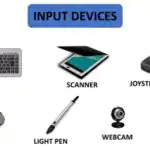
- Charts/pictures showing different input devices
- Computer system (desktop or laptop)
Rationale for the Lesson
Input devices are the tools used to enter data and instructions into a computer. Understanding them helps pupils use computers correctly for learning, communication, and business tasks.
Prerequisite/Previous Knowledge
Pupils have seen and used a keyboard and mouse, and they know that a computer needs data and instructions to work.
Lesson Content/Board Summary
Input Devices
Definition of Input Devices
An input device is any hardware used to enter data and instructions into a computer for processing.
Types of Input Devices
The following are types of input devices based on the kind of data entered:
- Text entry devices (e.g., keyboard).
- Pointing devices (e.g., mouse).
- Image and document capture devices (e.g., scanner, digital camera).
- Audio input devices (e.g., microphone).
- Control/game input devices (e.g., joystick).
- Card and code reading devices (e.g., card reader).
- Pen-based input devices (e.g., light pen).
Keyboard
The keyboard is a text entry device used to type letters, numbers, and symbols into the computer.
The following are uses of a keyboard:
- Typing documents and notes.
- Entering numbers and data into tables.
- Giving commands using keys such as Enter, Shift, and function keys.
Mouse
The mouse is a pointing device used to move the pointer and select items on the screen.
The following are uses of a mouse:
- Pointing, clicking, and selecting icons or files.
- Dragging and dropping items on the screen.
- Scrolling through pages using the wheel (if available).
Scanner
A scanner is an input device that converts printed text or pictures into digital form for the computer.
The following are uses of a scanner:
- Scanning documents into the computer for storage.
- Digitizing pictures and printed images.
- Supporting document sharing and record keeping.
Microphone
A microphone is an audio input device used to capture sound and voice into a computer.
The following are uses of a microphone:
- Voice recording and narration.
- Online communication and meetings.
- Voice input for speech-to-text (where available).
Joystick
A joystick is a control input device used mainly for games and simulations.
The following are uses of a joystick:
- Controlling movement in computer games.
- Training simulations (e.g., driving or flight simulation).
- Controlling certain specialised software tools.
Card Reader
A card reader is an input device that reads data stored on cards such as ATM cards, ID cards, or memory cards.
The following are uses of a card reader:
- Reading ATM or identity card information in authorised systems.
- Reading memory cards from cameras and phones.
- Supporting access control and verification in organisations.
Light Pen
A light pen is a pen-like input device used to select or draw directly on a special screen.
The following are uses of a light pen:
- Selecting items on a screen.
- Drawing and simple design work on supported screens.
- Precise pointing in graphics applications.
Digital Camera
A digital camera is an input device used to capture images and videos that can be transferred to a computer.
The following are uses of a digital camera:
- Capturing pictures for documents and presentations.
- Recording videos for learning and events.
- Providing image data for editing and printing.
Teaching Methods/Instructional Techniques
Discussion, Lecture, Demonstration, Question and Answer, Visual Aids
Instructional Procedures
Step 1: Introduction
Time: 5 minutes
Teaching Skill: Set Induction
Teacher’s Activity: The teacher shows a keyboard and mouse and asks pupils to state what they are used for, then links responses to the meaning of input devices.
Pupils’ Activity: Pupils respond and observe the displayed devices.
Learning Point: Input devices are used to enter data and instructions into a computer.
Step 2: Meaning of Input Devices
Time: 6 minutes
Teaching Skill: Explanation
Teacher’s Activity: The teacher defines input devices and writes the definition on the board, giving simple examples.
Pupils’ Activity: Pupils copy the definition and mention examples they know.
Learning Point: An input device is hardware used for data entry into a computer system.
Step 3: Types of Input Devices
Time: 7 minutes
Teaching Skill: Classification
Teacher’s Activity: The teacher explains types of input devices and groups them by the kind of data entered (text, pointing, audio, image, control, card, pen-based).
Pupils’ Activity: Pupils copy the types and give one example for each type.
Learning Point: Input devices can be grouped by the kind of data they enter.
Step 4: Identification of Common Input Devices
Time: 8 minutes
Teaching Skill: Demonstration
Teacher’s Activity: The teacher displays input devices (or pictures) and guides pupils to name each: keyboard, mouse, scanner, microphone, joystick, card reader, light pen, digital camera.
Pupils’ Activity: Pupils identify and correctly name the devices displayed.
Learning Point: Common input devices have distinct shapes and functions.
Step 5: Uses of Input Devices
Time: 8 minutes
Teaching Skill: Explanation and Illustration
Teacher’s Activity: The teacher explains the use of each device and links each to real-life uses in school, home, offices, banks, and media work.
Pupils’ Activity: Pupils state one use of each device and copy key points.
Learning Point: Each input device is designed for a specific kind of data entry.
Step 6: Class Activity (Matching and Grouping)
Time: 6 minutes
Teaching Skill: Guided Practice
Teacher’s Activity: The teacher gives pupils pictures/names of devices and instructs groups to match devices to their types and uses, then present answers.
Pupils’ Activity: Pupils work in groups, match correctly, and present findings.
Learning Point: Input devices can be identified, grouped, and linked to their uses.
Step 7: Evaluation/Review
Time: 5 minutes
Teaching Skill: Questioning/Assessment
Teacher’s Activity: The teacher evaluates the learning by asking the following questions:
- Define an input device.
- List four input devices used for data entry.
- State two uses of a scanner.
- Mention one difference between a keyboard and a mouse.
Pupils’ Activity: Pupils answer orally and in writing.
Learning Point: Pupils demonstrate understanding of the lesson.
Step 8: Conclusion
Time: 0 minutes
Teaching Skill: Summarization
Teacher’s Activity: The teacher summarizes the definition, types, and examples of input devices and corrects misconceptions. Assignment: write eight input devices and state one use of each.
Pupils’ Activity: Pupils copy the summary and assignment.
Learning Point: Input devices are essential for entering different kinds of data into a computer.
Lesson Keywords
- Input Device – A hardware device used to enter data and instructions into a computer.
- Keyboard – A text entry device used to type letters, numbers, and symbols.
- Mouse – A pointing device used to move the pointer and select items on the screen.
- Scanner – A device that converts printed documents or pictures into digital form.
- Microphone – An audio input device used to record voice and sound into a computer.
- Joystick – A control device used mainly for games and simulations.
- Card Reader – A device used to read data stored on cards or memory cards.
- Light Pen – A pen-like device used to select or draw on a supported screen.
- Digital Camera – A device used to capture images and videos for transfer to a computer.
Differentiation
Pupils who need support will use labelled pictures and guided prompts to identify devices and state uses, while advanced pupils will classify each device by type and explain the kind of data it inputs with examples.
Note for teachers using this lesson plan
Use real devices where available and clear pictures where devices are not available. Emphasize examinable points: definition, types, examples, and uses. Ensure pupils can correctly distinguish text entry devices, pointing devices, and capture devices, and reinforce safe handling of all computer equipment.


Community Join the conversation Open discussion +