

Class: Primary 4
Term: 3rd Term
Subject: Basic Science And Technology
Curriculum Theme: Computer studies
Previous Lesson: Meaning And Examples Of Social Media
Topic: Data Collection – Computer As An facts Processing Machine
Content/Learning Area: Computer As An Information Processing Machine (IPO)
Time Allocation: 40 minutes
Performance Objectives
By the end of the lesson, pupils should be able to:
- Cognitive Domain: Explain how a computer collects data through input devices.
- Affective Domain: Show interest in how computers receive and process information.
- Psychomotor Domain: Identify and demonstrate how some input devices work.
- Social Domain: Cooperate in group activities involving the use of input devices.
Reference Materials
The following resources were used in planning this lesson:
- 9 Years Basic Education Curriculum
- Abuja Educational Resource Center Scheme of Work
- NAPPS National Unified Scheme of Work
- Online Information from: Wikipedia - Data collection
- Relevant Textbooks
instructional materials
To deliver this lesson, the teacher will employ the help of the following materials:
- Real input devices (keyboard, mouse, microphone, etc.)
- Charts showing the IPO cycle
- A functional computer system
- Flash cards showing examples of data
- Whiteboard and markers
Rationale for the Lesson
Understanding computers as information processors helps children grasp how devices collect and use data daily.
Prerequisite/Previous Knowledge
Pupils have previously seen and used basic computer devices like a keyboard or mouse and understand that computers help in doing tasks.
Lesson Content
Computer As An Information Processing machine
A computer is a machine that collects, processes, and gives back information. it uses a special method called the IPO process. IPO means Input, Process, and Output.
Meaning of IPO
IPO stands for Input, Process, and Output. This is how computers handle data.
The following are the meanings:
- Input is when the computer collects data
- Process is when the computer works on the data
- Output is when the computer gives the result
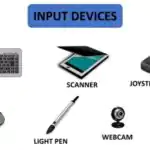
Input Devices
Input devices are tools we use to give data to the computer.
Examples are:
- Keyboard
- mouse
- Microphone
- Scanner
- Joystick
- Webcam
- Touchpad
- Graphics tablet
- Barcode reader
- Magnetic stripe reader
Examples of Data Collected
The computer collects many types of data using input devices.
These include:
- Letters typed on a keyboard
- Pictures scanned by a scanner
- Voices recorded with a microphone
- Movements from a joystick
- Clicks from a mouse
- Images captured by a webcam
- drawings made on a graphics tablet
- Data read by a barcode reader
- Information from a magnetic stripe reader
- Selections made on a touchscreen
Teaching Methods
To deliver this lesson, the teacher will adopt the following methods: Discussion, Lecture, Demonstration, Explanation, Visual Aids, Group Work
Instructional procedures
To deliver this lesson, the teacher will adopt the following steps:
Step 1: Introduction (Set Induction)
Time: 5 mins
Teaching Skill: Set Induction
Teacher’s Activity: The teacher shows a keyboard and asks, “What do we use this for?” Then tells a short story of how computers help people type and talk.
Pupils’ activity: Pupils respond to questions and listen to the story.
Step 2: Meaning of IPO
Time: 7 mins
Teaching Skill: Explanation
Teacher’s Activity: The teacher explains the IPO model using diagrams and gives real-life examples.
Pupils’ Activity: Pupils listen and observe the charts.
step 3: Input Devices
Time: 7 mins
Teaching Skill: Demonstration
Teacher’s Activity: The teacher shows and names different input devices and describes their functions.
pupils’ Activity: Pupils identify and touch real devices.
Step 4: Examples of Data Collected
Time: 6 mins
Teaching Skill: Explanation
Teacher’s Activity: The teacher describes different data collected using input devices.
Pupils’ Activity: Pupils mention examples and take turns demonstrating.
Step 5: Note-Taking
Time: 5 mins
Teaching Skill: Writing
Teacher’s activity: The teacher dictates the note and writes on the board.
pupils’ Activity: Pupils copy the note into their books.
Step 6: Evaluation/Review
time: 5 mins
Teaching Skill: Assessment
Teacher’s Activity: The teacher asks oral questions and practical tasks based on the lesson.
Pupils’ activity: Pupils answer questions and perform tasks.
Objective-aligned checks:
- Explain how a computer collects data through input devices.
- Identify and demonstrate how some input devices work.
- Cooperate in group activities involving the use of input devices.
Step 7: Conclusion
Time: 5 mins
Teaching Skill: Cognitive and Instructional Closure
Teacher’s Activity: The teacher summarizes the lesson and connects it to future learning on processing and output. Encourages pupils to notice input devices around them.
Pupils’ Activity: Pupils listen and ask final questions.
Home Task: Record two correct examples of Data Collection – Computer As An facts Processing Machine from the lesson or home environment and explain each in your own words.
Lesson Keywords
- Computer: A machine that processes information
- Input: The data we give to a computer
- Process: The work the computer does on data
- Output: The result the computer gives
- Device: A tool used with the computer
Lesson Evaluation
To evaluate the learning, the teacher asks pupils to:
- What is IPO in computers?
- Name three input devices.
- Give two examples of data a computer can collect.
- What is the work of the keyboard?
- Show how you use the mouse to give data.
Differentiation
Teacher uses real objects, visual aids, and group work to support all learning styles and ensure every pupil understands the topic.
Note for teachers using this lesson plan
Ensure pupils have hands-on interaction with real or simulated input devices. Use storytelling and visual aids to simplify complex ideas.

Community Join the conversation Open discussion +