

Class: Senior Secondary School 1 (SS1, SS 1, SSS1, SSS 1)
Term: 3rd Term
Week: 4
Age: 15 years
Duration: 45 minutes
Subject: Computer Studies
Curriculum Theme: Computer Studies
Previous Lesson: Communication Systems III.
Topic: APPLICATION AREA OF ICT
Subject Matter: ICT based gadgets, mobile phones, computer, fax machines, automated teller machine, dispensing machines, point of sales machine, automated cash register, radio set, operation of ICT based gadgets
Specific Objectives
By the end of the lesson, pupils should be able to:
Cognitive Domain:
- Identify various ICT-based gadgets.
- State the uses of different ICT-based gadgets.
- Explain the basic operation of selected ICT-based gadgets.
Affective Domain:
- Appreciate the importance of ICT-based gadgets in daily life.
- Demonstrate interest in learning about the applications of ICT.
Psychomotor Domain:
- Operate simple ICT-based gadgets under supervision.
- Handle ICT gadgets with care.
Social Domain:
- Collaborate with peers to discuss the functions of ICT gadgets.
Reference Materials
The following resources were used in planning this lesson:
- 9 Years Basic Education Curriculum (Computer Studies for Senior Secondary Schools).
- State Unified Scheme of Work for Computer Studies SSS 1.
- Adewumi, A. B. (2018). Computer Studies for Senior Secondary Schools 1. Learn Africa Plc.
Instructional Materials
The teacher will teach this lesson with the aid of:
- Charts and pictures of various ICT gadgets (e.g., mobile phone, ATM, computer, radio).
- Actual ICT gadgets (e.g., a mobile phone, a simple radio, calculator, if available).
- Whiteboard/Chalkboard and markers/chalk.
Rationale for the Lesson
This lesson helps pupils recognize how ICT gadgets are used in their everyday lives and various sectors. Understanding these applications enables them to interact with technology more effectively and appreciate its role in society and personal productivity.
Prerequisite/Previous Knowledge
Pupils have basic knowledge of what a computer is and simple electronic devices. They also have some exposure to various electronic gadgets used in their homes and communities.
Lesson Content/Board Summary
APPLICATION AREAS OF ICT
Meaning of ICT-Based Gadgets
ICT-based gadgets are electronic devices that use information and communication technology to perform specific functions. They are designed to process, store, retrieve, transmit, and receive information, thereby simplifying tasks and improving efficiency.
Examples of ICT-Based Gadgets and their Uses
The following are examples of ICT-based gadgets and their common uses:
- Mobile Phones: Used for communication (calls, SMS), internet browsing, photography, accessing information, mobile banking, and entertainment.
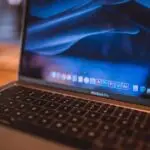
- Computers (Desktops, Laptops, Tablets): Used for data processing, writing documents, internet access, design, education, entertainment, and complex calculations.
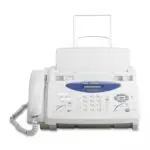
- Fax Machines: Used to transmit documents over telephone lines, sending and receiving copies of papers quickly.
- Automated Teller Machines (ATMs): Used for cash withdrawals, deposits, balance inquiries, and fund transfers without human assistance.
- Dispensing Machines (Vending Machines): Used to automatically dispense products like drinks, snacks, or tickets upon payment.
- Point of Sales (POS) Machines: Used in retail stores to process transactions, accept card payments, and manage sales records.
- Automated Cash Registers: Used in businesses to calculate and record sales, handle cash, and print receipts.
- Radio Sets: Used for receiving audio broadcasts (news, music, educational programs) and for communication in some contexts.
Basic Operation of Selected ICT-Based Gadgets
Operating ICT gadgets generally involves powering them on, interacting with their interface, and understanding their specific functions. For example:
- Mobile Phone: Press the power button to switch on/off, use the touchscreen or keypad to dial numbers, navigate menus, and launch applications.
- Radio Set: Turn the power knob to switch on, adjust the volume, and tune to desired frequencies using the tuning knob or buttons.
- ATM: Insert ATM card, enter PIN, select transaction type (e.g., withdrawal, balance inquiry), enter amount, and collect cash/receipt.
Teaching Methods/Instructional Techniques
Discussion, Lecture, Demonstration, Question and Answer, Visual Aids
Instructional Procedures
Step 1: Introduction
Time: 5 minutes
Teaching Skill: Set Induction
Teacher’s Activity: The teacher greets the pupils, reviews the previous lesson briefly, and then introduces the new topic by asking pupils to identify electronic devices they use daily (e.g., phones, radios). The teacher then links these to ICT-based gadgets.
Pupils’ Activity: Pupils respond to questions and listen attentively.
Learning Point: Pupils are prepared for the new lesson and connect it to their prior knowledge.
Step 2: Explanation of ICT-Based Gadgets
Time: 10 minutes
Teaching Skill: Explanation/Definition
Teacher’s Activity: The teacher defines ICT-based gadgets and presents various examples using charts and pictures. The teacher explains that these gadgets are designed to handle information and communication.
Pupils’ Activity: Pupils listen, take notes, and ask questions for clarification.
Learning Point: Pupils understand the meaning of ICT-based gadgets and can identify different types.
Step 3: Discussion of Specific Gadgets and Uses
Time: 10 minutes
Teaching Skill: Discussion/Questioning
Teacher’s Activity: The teacher leads a discussion on specific ICT-based gadgets mentioned in the subject matter (mobile phones, computers, fax machines, ATMs, dispensing machines, POS, automated cash registers, radio sets). For each gadget, the teacher asks pupils to mention its uses and importance in daily life.
Pupils’ Activity: Pupils actively participate in the discussion, sharing their knowledge and experiences regarding the uses of the gadgets.
Learning Point: Pupils can state the uses of various ICT-based gadgets.
Step 4: Demonstration of Gadget Operation
Time: 8 minutes
Teaching Skill: Demonstration
Teacher’s Activity: The teacher demonstrates the basic operation of one or two simple ICT-based gadgets (e.g., how to switch on/off a mobile phone, make a call, or tune a radio). The teacher emphasizes safety and care when handling such devices.
Pupils’ Activity: Pupils observe the demonstration carefully and ask questions.
Learning Point: Pupils understand the basic operational steps of some ICT gadgets.
Step 5: Pupils’ Practice/Activity
Time: 5 minutes
Teaching Skill: Guided Practice
Teacher’s Activity: If actual gadgets are available, the teacher supervises pupils as they attempt to perform simple operations demonstrated earlier. If not, pupils discuss in small groups the steps involved in using an ATM or POS machine.
Pupils’ Activity: Pupils practice operating the gadgets or discuss the operational steps in groups.
Learning Point: Pupils gain practical experience or solidify their understanding of gadget operation.
Step 6: Class Discussion/Q&A
Time: 2 minutes
Teaching Skill: Clarification
Teacher’s Activity: The teacher addresses any remaining questions from the pupils and clarifies any misconceptions about ICT-based gadgets or their operations.
Pupils’ Activity: Pupils ask final questions and listen to clarifications.
Learning Point: Pupils’ understanding is reinforced and any doubts are cleared.
Step 7: Evaluation/Review
Time: 5 minutes
Teaching Skill: Questioning/Assessment
Teacher’s Activity: The teacher evaluates the learning by asking the following questions:
- What are ICT-based gadgets?
- Mention four examples of ICT-based gadgets.
- State two uses of a mobile phone.
- Describe how an Automated Teller Machine (ATM) can be used for cash withdrawal.
Pupils’ Activity: Pupils answer orally and in writing.
Learning Point: Pupils demonstrate understanding of the lesson.
Step 8: Conclusion
Time: 5 minutes
Teaching Skill: Summarization/Assignment
Teacher’s Activity: The teacher summarizes the key points of the lesson, reiterating the importance of ICT gadgets in various aspects of life. The teacher then assigns homework: “List five ICT-based gadgets not discussed in class and state one use for each.”
Pupils’ Activity: Pupils listen to the summary and copy the homework.
Learning Point: Pupils consolidate their learning and prepare for further exploration of the topic.
Lesson Keywords
- ICT-based gadgets – Electronic devices that use information and communication technology to perform specific functions.
- Mobile phone – A portable telephone that can make and receive calls over a radio frequency link while the user is moving within a telephone service area.
- Computer – An electronic device that processes data, performs calculations, and executes instructions.
- ATM (Automated Teller Machine) – An electronic telecommunications device that enables customers of financial institutions to perform financial transactions, such as cash withdrawals, without the need for a human cashier or teller.
- POS (Point of Sales) machine – A device used by businesses to process card payments and manage sales transactions.
- Fax machine – A device used for transmitting scanned printed material (text or images) by telephone or radio.
- Radio set – An electronic device that receives radio waves and converts them into sound.
Differentiation
For pupils who grasp concepts quickly, the teacher can challenge them to explain the working principles of more complex gadgets or research future trends in ICT gadgets. For pupils who require additional support, the teacher can provide more direct guidance, pair them with faster learners for peer tutoring, and offer simplified explanations or additional visual aids.
Note for teachers using this lesson plan
Teachers should encourage pupils to share their personal experiences with ICT gadgets to make the lesson more relatable. Practical demonstrations, even with simulated actions, are highly effective. Emphasize the responsible use and care of these gadgets to instill good digital citizenship.


Community Join the conversation Open discussion +