

Class: Senior Secondary School 1 (SS1, SS 1, SSS1, SSS 1)
Term: 1st Term
Week: 1
Age: 15 years
Duration: 45 minutes
Subject: Computer Studies
Curriculum Theme: Computer Studies
Previous Lesson: .
Topic: Overview of Computer System
Subject Matter: Definition of computer, two main constituents of a computer (hardware and software), broad classes of computer, characteristics of a computer
Specific Objectives
By the end of the lesson, pupils should be able to:
Cognitive Domain:
- Define a computer.
- State the two main constituents of a computer system.
- Differentiate between hardware and software with examples.
- State broad classes of computers.
- List characteristics of a computer.
Affective Domain:
- Show interest in using computers responsibly for learning.
- Appreciate the importance of computers in school and daily life.
Psychomotor Domain:
- Identify parts of a computer system by pointing to real components or pictures.
- Classify given items as hardware or software during a guided activity.
Social Domain:
- Work in groups to sort examples of hardware and software and present answers.
- Listen to others’ contributions and respond respectfully during discussion.
Reference Materials
The following resources were used in planning this lesson:
- 9 Years Basic Education Curriculum
- State Unified Scheme of Work
- New Computer Studies for Senior Secondary Schools (SSS 1)
- Encyclopaedia Britannica: Computer
- GCFGlobal: Computer Basics
- Computer History Museum: Computer Timeline
Instructional Materials
The teacher will teach this lesson with the aid of:
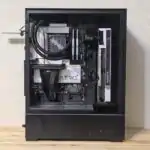
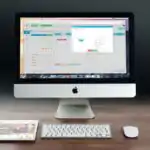
- A complete computer set (system unit, monitor, keyboard, mouse)
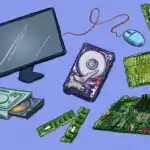
- Parts of a computer (or pictures of parts) such as RAM, hard disk/SSD, flash drive
- Charts and pictures showing hardware and software examples
- Printed screenshots of common software (operating system, word processor, browser)
- Marker board and card labels (Hardware/Software)
Rationale for the Lesson
This lesson helps pupils understand what a computer is and what makes up a computer system. It enables pupils to identify computer parts and software they use in school and at home.
Prerequisite/Previous Knowledge
Pupils have seen or used computers and mobile devices and can mention simple uses such as typing, browsing, and playing videos.
Lesson Content/Board Summary
Overview of Computer System
Definition of Computer
A computer is an electronic device that accepts data as input, processes the data using instructions, stores it, and produces information as output.
Two Main Constituents of a Computer System
The following are the two main constituents of a computer system:
- Hardware: Physical parts of the computer that can be seen and touched.
- Software: Programs and instructions that tell the computer what to do.
Examples of Hardware and Software
The following are examples of hardware:
- System unit
- Monitor
- Keyboard
- Mouse
- Printer
- Hard disk/SSD
- Flash drive
The following are examples of software:
- Operating system (e.g., Windows, Linux)
- Word processing software
- Spreadsheet software
- Web browser
- Antivirus software
Broad Classes of Computers
The following are broad classes of computers:
- Analog computers: Work with continuous values (e.g., measurements) rather than numbers.
- Digital computers: Work with numbers and discrete values and are the common type used in schools and offices.
Characteristics of a Computer
The following are characteristics of a computer:
- Speed: Performs tasks very fast.
- Accuracy: Produces correct results when the input and instructions are correct.
- Storage: Stores large amounts of data and information.
- Diligence: Can repeat tasks without getting tired.
- Versatility: Can perform many different tasks (typing, calculating, designing, browsing).
- Automation: Works automatically once instructions are given.
Teaching Methods/Instructional Techniques
Discussion, Lecture, Demonstration, Question and Answer, Visual Aids
Instructional Procedures
Step 1: Introduction
Time: 5 minutes
Teaching Skill: Set Induction
Teacher’s Activity: The teacher shows a computer set or pictures and asks pupils to mention where they have seen computers and what they are used for. The teacher links responses to the lesson topic and states the lesson objectives.
Pupils’ Activity: Pupils mention uses of computers and places where they are found (school, bank, home, phone shops).
Learning Point: Computers are used for many tasks in school, work, and daily life.
Step 2: Definition of Computer
Time: 6 minutes
Teaching Skill: Explanation
Teacher’s Activity: The teacher defines a computer and explains input, processing, storage, and output using simple examples (typing a document, saving, and printing).
Pupils’ Activity: Pupils copy the definition and give one example each of input and output.
Learning Point: A computer accepts data, processes it, stores it, and produces information.
Step 3: Hardware and Software
Time: 8 minutes
Teaching Skill: Demonstration
Teacher’s Activity: The teacher explains hardware and software and demonstrates by pointing to physical parts and showing screenshots of programs. The teacher emphasizes the difference between what can be touched and what cannot be touched.
Pupils’ Activity: Pupils identify items as hardware or software and copy key notes.
Learning Point: Hardware is physical parts; software is programs and instructions.
Step 4: Examples of Hardware and Software
Time: 7 minutes
Teaching Skill: Guided Practice
Teacher’s Activity: The teacher displays pictures/labels of items and guides pupils to sort them into hardware and software groups, then lists correct examples on the board.
Pupils’ Activity: Pupils sort the examples in groups and write the correct list in their notebooks.
Learning Point: Hardware and software have different examples that can be identified easily.
Step 5: Broad Classes of Computers
Time: 6 minutes
Teaching Skill: Discussion
Teacher’s Activity: The teacher introduces analog and digital computers and explains the difference using simple examples (continuous measurement versus numbers).
Pupils’ Activity: Pupils state which type is commonly used in school and give reasons.
Learning Point: Computers can be broadly classified into analog and digital.
Step 6: Characteristics of a Computer
Time: 8 minutes
Teaching Skill: Explanation/Question and Answer
Teacher’s Activity: The teacher explains key characteristics (speed, accuracy, storage, diligence, versatility, automation) and writes points clearly on the board.
Pupils’ Activity: Pupils mention one characteristic each and copy the listed points.
Learning Point: Computers are fast, accurate, store data, and can perform many tasks.
Step 7: Evaluation/Review
Time: 5 minutes
Teaching Skill: Questioning/Assessment
Teacher’s Activity: The teacher evaluates the learning by asking the following questions:
- Define a computer.
- State the two main constituents of a computer system.
- List four characteristics of a computer.
- Mention two broad classes of computers.
Pupils’ Activity: Pupils answer orally and in writing.
Learning Point: Pupils demonstrate understanding of the lesson.
Step 8: Conclusion
Time: 0 minutes
Teaching Skill: Summarization
Teacher’s Activity: The teacher summarizes the definition of computer, hardware and software, broad classes of computers, and characteristics of computers. Assignment: write five examples each of hardware and software and state any four characteristics of a computer.
Pupils’ Activity: Pupils copy the summary and assignment.
Learning Point: A computer system has hardware and software and has clear features that make it useful.
Lesson Keywords
- Computer – An electronic device that accepts data, processes it, stores it, and produces output.
- Data – Raw facts entered into a computer for processing.
- Information – Processed data that is meaningful.
- Hardware – Physical parts of a computer that can be touched.
- Software – Programs and instructions used to operate the computer.
- Digital computer – A computer that works with numbers and discrete values.
- Analog computer – A computer that works with continuous values.
Differentiation
Pupils who need support will use picture cards to match items to hardware or software, while advanced learners will explain how input, processing, storage, and output occur in a simple activity such as typing and printing a document.
Note for teachers using this lesson plan
Use real objects and clear pictures to make the difference between hardware and software easy to understand. Keep definitions short and ensure pupils can list examples and characteristics in an exam-friendly format.

Community Join the conversation Open discussion +