

Class: Senior Secondary School 1 (SS1, SS 1, SSS1, SSS 1)
Term: 3rd Term
Week: 6
Age: 15 years
Duration: 45 minutes
Subject: Visual Art
Curriculum Theme: Visual Art
Previous Lesson: Introduction to Art Appreciation: Evaluating Artworks and Design Principles.
Topic: INTRODUCTION TO COMPUTER GRAPHICS
Subject Matter: Computer Hardware Components
Specific Objectives
By the end of the lesson, pupils should be able to:
Cognitive Domain:
- Define computer hardware.
- Identify various computer hardware components.
- Distinguish between different types of hardware components.
Affective Domain:
- Appreciate the importance of computer hardware in visual art and everyday life.
- Show interest in learning more about computer technology.
Psychomotor Domain:
- Point to and name different computer hardware components on a physical computer set.
- Operate basic input and output devices.
Social Domain:
- Collaborate with peers to identify and discuss hardware components.
Reference Materials
The following resources were used in planning this lesson:
- 9 Years Basic Education Curriculum for Visual Art.
- State Unified Scheme of Work for Senior Secondary School Visual Art.
- Visual Arts for Senior Secondary Schools 1 by J.K. Ajayi.
- Online resources on computer hardware.
Instructional Materials
The teacher will teach this lesson with the aid of:
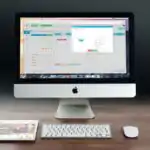
- A complete computer set (monitor, system unit, keyboard, mouse).
- A scanner.
- A printer.
- Charts showing different computer hardware components.
Rationale for the Lesson
This lesson helps pupils understand the basic physical parts of a computer, which are essential tools for creating digital art. Knowing these components enables pupils to better interact with and utilize computers for visual graphics work, making their learning experience more practical and relevant.
Prerequisite/Previous Knowledge
Pupils are familiar with basic electronic gadgets and may have used computers in other subjects or at home.
Lesson Content/Board Summary
Computer Hardware Components
1. Meaning of Computer Hardware
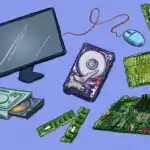
Computer hardware refers to the physical, tangible components of a computer system that can be seen and touched. These are the electronic and mechanical parts that make up a computer.
2. Types of Computer Hardware Components
Computer hardware components can be broadly categorized based on their function. The following are common components:
- Input Devices: Used to enter data and instructions into the computer.
- Keyboard: Used to type text, numbers, and commands.
- Mouse: Used to control the cursor on the screen and select items.
- Scanner: Used to convert physical documents or images into digital format.
- Output Devices: Used to display or present information from the computer.
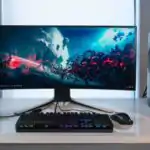
- Monitor: Displays visual output from the computer, such as text and images.
- Printer: Produces hard copies of digital documents or images on paper.
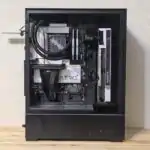
- System Unit (Processing Device): The main part of a computer that processes data and contains the central processing unit (CPU), memory, and other essential components. It is often referred to as the “brain” of the computer.
3. Identifying Computer Hardware Components
It is important to be able to identify the different parts of a computer system. This involves recognizing the monitor, system unit, keyboard, mouse, printer, and scanner by their appearance and understanding their basic functions.
Teaching Methods/Instructional Techniques
Discussion, Lecture, Demonstration, Question and Answer, Visual Aids
Instructional Procedures
Step 1: Introduction
Time: 5 minutes
Teaching Skill: Set Induction
Teacher’s Activity: The teacher greets the pupils, reviews the previous lesson briefly, and then introduces the topic “Introduction to Computer Graphics” by asking pupils about their experiences with computers or digital art.
Pupils’ Activity: Pupils respond to the teacher’s questions and listen attentively.
Learning Point: Pupils are prepared for the new lesson and connect it to their prior knowledge.
Step 2: Meaning of Computer Hardware
Time: 7 minutes
Teaching Skill: Explanation/Definition
Teacher’s Activity: The teacher defines computer hardware, explaining that it refers to the physical parts of a computer system. The teacher shows a complete computer set and points out some visible hardware components.
Pupils’ Activity: Pupils listen, take notes, and observe the computer components shown.
Learning Point: Pupils understand the definition of computer hardware.
Step 3: Input Devices
Time: 7 minutes
Teaching Skill: Demonstration/Explanation
Teacher’s Activity: The teacher explains and demonstrates the functions of input devices mentioned in the subject matter: keyboard, mouse, and scanner. The teacher allows pupils to briefly interact with these devices.
Pupils’ Activity: Pupils observe the demonstration, ask questions, and practice identifying and using the devices.
Learning Point: Pupils identify and understand the function of common input devices.
Step 4: Output Devices
Time: 7 minutes
Teaching Skill: Demonstration/Explanation
Teacher’s Activity: The teacher explains and demonstrates the functions of output devices: monitor and printer. The teacher shows how information is displayed on the monitor and how a printer produces a hard copy.
Pupils’ Activity: Pupils watch the demonstration, ask questions, and understand the role of output devices.
Learning Point: Pupils identify and understand the function of common output devices.
Step 5: System Unit
Time: 7 minutes
Teaching Skill: Explanation/Illustration
Teacher’s Activity: The teacher explains the system unit as the main processing unit of the computer, showing its physical appearance and explaining its importance as the “brain” of the computer. The teacher mentions that it houses components like the CPU and memory.
Pupils’ Activity: Pupils listen, observe the system unit, and understand its central role.
Learning Point: Pupils understand the function and importance of the system unit.
Step 6: Identifying Computer Hardware Components
Time: 5 minutes
Teaching Skill: Practical Application/Identification
Teacher’s Activity: The teacher conducts a quick identification activity, pointing to various hardware components (monitor, system unit, keyboard, mouse, printer, scanner) and asking pupils to name them and state their basic function.
Pupils’ Activity: Pupils actively participate by naming the components and stating their functions.
Learning Point: Pupils reinforce their ability to identify and describe computer hardware components.
Step 7: Evaluation/Review
Time: 5 minutes
Teaching Skill: Questioning/Assessment
Teacher’s Activity: The teacher evaluates the learning by asking the following questions:
- Define computer hardware.
- Mention three input devices discussed in the lesson.
- List two output devices.
- What is the main function of the system unit?
Pupils’ Activity: Pupils answer orally and in writing.
Learning Point: Pupils demonstrate understanding of the lesson.
Step 8: Conclusion
Time: 2 minutes
Teaching Skill: Summarization
Teacher’s Activity: The teacher summarizes the key points of the lesson, emphasizing the importance of understanding computer hardware as a foundation for computer graphics. The teacher gives a take-home assignment: “Draw and label any three computer hardware components you learned today.”
Pupils’ Activity: Pupils listen to the summary and copy the assignment.
Learning Point: Pupils consolidate their learning and prepare for future topics.
Lesson Keywords
- Computer Hardware – The physical, tangible components of a computer system.
- Monitor – An output device that displays visual information.
- System Unit – The main part of a computer that processes data.
- Printer – An output device that produces hard copies of documents.
- Keyboard – An input device used to enter text and commands.
- Mouse – An input device used to control the cursor and select items.
- Scanner – An input device used to convert physical documents into digital files.
Differentiation
For pupils who grasp concepts quickly, the teacher can ask them to research other types of hardware components. For pupils who need more support, the teacher will provide additional visual aids and guided practice in identifying components.
Note for teachers using this lesson plan
Teachers should ensure all instructional materials, especially the computer set, are functional and available before the lesson. Practical demonstration and hands-on interaction are essential for this topic to enhance pupils’ understanding and engagement.
Community Join the conversation Open discussion +