

Class: Senior Secondary School 1 (SS1, SS 1, SSS1, SSS 1)
Term: 1st Term
Week: 2
Age: 15 years
Duration: 45 minutes
Subject: Computer Studies
Curriculum Theme: Computer Studies
Previous Lesson: Overview of Computer System.
Topic: Computer Hardware and Computer Software
Subject Matter: Computer hardware (system unit and peripherals), computer software (system software and application software), examples of hardware and software
Specific Objectives
By the end of the lesson, pupils should be able to:
Cognitive Domain:
- Define computer hardware and computer software.
- Explain the meaning of system unit and peripherals.
- Differentiate between system software and application software.
- List examples of hardware and software.
Affective Domain:
- Show willingness to handle computer parts carefully and responsibly.
- Appreciate the importance of software in making computer hardware useful.
Psychomotor Domain:
- Identify the system unit and common peripherals on a computer set.
- Sort given items correctly into hardware and software groups.
Social Domain:
- Work in small groups to classify computer components and present answers.
- Participate actively in discussion and respect others’ opinions.
Reference Materials
The following resources were used in planning this lesson:
- 9 Years Basic Education Curriculum
- State Unified Scheme of Work
- New Computer Studies for Senior Secondary Schools (SSS 1)
- Encyclopaedia Britannica: Computer
- GCFGlobal: Inside a Computer
- Encyclopaedia Britannica: Software
Instructional Materials
The teacher will teach this lesson with the aid of:
- A computer set (system unit, monitor, keyboard, mouse)
- Computer parts or pictures (printer, scanner, speakers, flash drive)
- Charts showing hardware and software examples
- Pictures or screenshots of system software and application software
- Card labels for sorting activity (Hardware/Software, System software/Application software)
Rationale for the Lesson
This lesson helps pupils understand the parts of a computer and the programs that make it work. It also enables pupils to identify what they can touch (hardware) and what runs inside the computer (software) in daily use.
Prerequisite/Previous Knowledge
Pupils have seen or used a computer and can mention simple parts like monitor, keyboard, and mouse, and simple programs like a browser or word processor.
Lesson Content/Board Summary
Computer Hardware and Computer Software
Meaning of Computer Hardware
Computer hardware refers to the physical parts of a computer system that can be seen and touched.
System Unit
The system unit is the main case that houses major internal components and carries out processing.
The following are common parts found in the system unit:
- Motherboard
- Processor (CPU)
- Memory (RAM)
- Storage device (hard disk/SSD)
- Power supply unit
Peripherals
Peripherals are hardware devices connected to a computer to help with input, output, storage, and communication.
The following are examples of peripherals:
- Monitor
- Keyboard
- Mouse
- Printer
- Scanner
- Speakers
- Webcam
- Flash drive
Meaning of Computer Software
Computer software refers to the programs and instructions that tell the computer what to do.
System Software
System software is software that controls the hardware and provides a platform for running other programs.
The following are examples of system software:
- Operating system (e.g., Windows, Linux)
- Device drivers
- Utility programs (e.g., antivirus, disk cleanup tools)
Application Software
Application software is software designed to help users perform specific tasks.
The following are examples of application software:
- Word processing software
- Spreadsheet software
- Presentation software
- Web browser
- Graphics editing software
Difference Between Hardware and Software
The following are differences between hardware and software:
- Hardware can be seen and touched, while software cannot be touched.
- Hardware is the physical equipment, while software is the set of programs and instructions.
- Hardware may wear out with use, while software does not wear out but can be corrupted or outdated.
Teaching Methods/Instructional Techniques
Discussion, Lecture, Demonstration, Question and Answer, Visual Aids
Instructional Procedures
Step 1: Introduction
Time: 5 minutes
Teaching Skill: Set Induction
Teacher’s Activity: The teacher displays a computer set or pictures and asks pupils to mention parts they can see and programs they have used. The teacher links responses to the topic and states the lesson objectives.
Pupils’ Activity: Pupils mention computer parts seen in class or at home and name common programs they know.
Learning Point: A computer system has physical parts and programs that work together.
Step 2: Meaning of Computer Hardware
Time: 7 minutes
Teaching Skill: Explanation
Teacher’s Activity: The teacher defines computer hardware and guides pupils to mention hardware items around the computer set. The teacher writes the definition and examples on the board.
Pupils’ Activity: Pupils copy the definition and list examples of hardware.
Learning Point: Hardware refers to physical parts of a computer that can be touched.
Step 3: System Unit and Peripherals
Time: 8 minutes
Teaching Skill: Demonstration
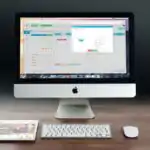
Teacher’s Activity: The teacher points to the system unit and explains its role, then identifies peripherals connected to the computer set. The teacher guides pupils to classify devices as system unit or peripherals.
Pupils’ Activity: Pupils identify the system unit and name peripherals connected to the computer set.
Learning Point: The system unit is the main case for processing, while peripherals are connected devices.
Step 4: Meaning of Computer Software
Time: 7 minutes
Teaching Skill: Explanation
Teacher’s Activity: The teacher defines computer software and explains that software controls tasks and helps users do work. The teacher shows screenshots or names of common programs.
Pupils’ Activity: Pupils copy the definition and mention programs they have used.
Learning Point: Software refers to programs and instructions that direct computer operations.
Step 5: System Software and Application Software
Time: 6 minutes
Teaching Skill: Discussion
Teacher’s Activity: The teacher explains system software and application software and provides examples of each. The teacher guides pupils to differentiate them using examples on the board.
Pupils’ Activity: Pupils classify examples into system software or application software.
Learning Point: System software runs the computer and supports other programs, while application software helps users perform tasks.
Step 6: Hardware and Software Classification Activity
Time: 5 minutes
Teaching Skill: Guided Practice
Teacher’s Activity: The teacher provides mixed items (pictures/labels) and guides pupils to sort them into hardware and software groups, then corrects responses.
Pupils’ Activity: Pupils work in groups to sort items and present their classifications.
Learning Point: Hardware and software can be identified and grouped correctly using clear examples.
Step 7: Evaluation/Review
Time: 5 minutes
Teaching Skill: Questioning/Assessment
Teacher’s Activity: The teacher evaluates the learning by asking the following questions:
- Define computer hardware.
- Define computer software.
- State the difference between system software and application software.
- List three peripherals and state one use of each.
Pupils’ Activity: Pupils answer orally and in writing.
Learning Point: Pupils demonstrate understanding of the lesson.
Step 8: Conclusion
Time: 2 minutes
Teaching Skill: Summarization
Teacher’s Activity: The teacher summarizes hardware, system unit, peripherals, software, and types of software with examples. Assignment: write five examples each of hardware and software and state two examples each of system software and application software.
Pupils’ Activity: Pupils copy the summary points and assignment.
Learning Point: Computer systems consist of hardware and software, and software is grouped into system and application types.
Lesson Keywords
- Hardware – Physical parts of a computer that can be seen and touched.
- System unit – The main case that houses major internal components and performs processing.
- Peripherals – Devices connected to a computer for input, output, storage, or communication.
- Software – Programs and instructions that tell the computer what to do.
- System software – Software that manages hardware and supports the running of other programs.
- Application software – Software used for specific tasks such as typing, calculating, or browsing.
Differentiation
Pupils who need support will use picture cards to match items to hardware or software, while advanced learners will classify software examples further and explain why an operating system is different from an application program.
Note for teachers using this lesson plan
Use real computer components where possible and allow pupils to point to parts for clear identification. Keep explanations short and ensure pupils can list examples and differences in a way that supports examination questions.

Community Join the conversation Open discussion +