

Class: Junior Secondary School 1 (JSS1, JSS 1)
Term: 1st Term
Week: 4
Age: 12 years
Duration: 45 minutes
Subject: Basic Science And Technology
Curriculum Theme: Computer Studies
Previous Lesson: Generations of Computers By Year, Technology, Speed and Storage Capacity
Topic: Basic Computer Concept
Subject Matter: Definition of Computer, Parts of a Computer System, Category of the Parts of the Computer, Description of a Computer as an Input and Output device.
Specific Objectives
By the end of the lesson, pupils should be able to:
- Cognitive Domain:
(a) Define what a computer is.
(b) Identify the main parts of a computer system.
(c) Classify the parts of a computer into hardware, software, and peopleware. - Affective Domain:
(a) Appreciate the role of the computer in modern life and learning.
(b) Develop a positive attitude towards proper use and care of computer systems. - Psychomotor Domain:
(a) Point out the visible parts of a computer system.
(b) Demonstrate how input and output devices are used in simple tasks. - Social Domain:
(a) Work together in groups to discuss how computers help in communication and education.
Reference Materials
The following resources were used in planning this lesson:
- 9 Years Basic Education Curriculum
- Lagos State Unified Scheme of work for Junior Secondary Schools
- Britannica – “Computer” (https://www.britannica.com/technology/computer)
- Relevant Textbooks
Instructional Materials
The teacher will teach this lesson with the aid of:
- A desktop computer or laptop
- Projector or chart showing parts of the computer system
- Flash cards with computer terms (hardware, software, input, output)
- Whiteboard and markers
- Pictures of different computer devices
Rationale for the Lesson
This lesson is important because it introduces pupils to the basic concepts of computers, their parts, and how they function as input and output devices, which is foundational for digital literacy.
Prerequisite/Previous Knowledge
Pupils are familiar with simple machines and devices from previous lessons and from daily life experiences. They may have seen or used mobile phones, calculators, or basic computers at home or school.
Lesson Content/Board Summary
Basic Computer Concept
A computer is an electronic machine that accepts data, processes it, and produces information as output. It can perform tasks quickly and accurately when given instructions.
Parts of a Computer System
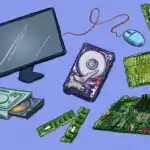
A computer system is made up of different physical parts called hardware. These parts work together to make the computer useful.
The following are the main parts of a computer system:
- Printer – gives out information from the computer on paper.
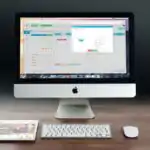
- Monitor – displays information and results to the user.
- Keyboard – used to type letters, numbers, and commands into the computer.
- Mouse – helps to move the pointer, select items, and open files.
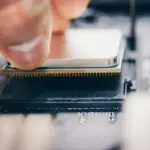
- System Unit – houses the brain of the computer and important components like CPU, memory, and storage.
- Speakers – produce sound from the computer.
Categories of the Parts of the Computer
The parts of the computer can be grouped according to their functions.
The following are the categories of computer parts:
- Input Devices – used to enter data into the computer, e.g. keyboard, mouse, scanner.
- Output Devices – used to display or produce information, e.g. monitor, printer, speakers.
- System Unit – contains the central processing unit (CPU), memory, and storage that process and store data.
Computer as an Input and Output Device
A computer can serve as both an input and output device depending on its use. Input devices allow data entry, while output devices present the results of the computer’s processing.
Examples include:
- Input devices such as keyboards and mice allow users to give instructions.
- Output devices such as monitors and printers display or produce the results of those instructions.
Teaching Methods/Instructional Techniques:
Lecture, Discussion, Explanation, Demonstration, Group Work, Question and Answer, Visual Aids
Instructional Procedures
To deliver this lesson, the teacher will adopt the following steps:
Step 1: Introduction
Time: 5 minutes
Teaching Skill: Set Induction
Teacher’s Activity: Teacher asks pupils if they have ever used a phone, calculator, or computer before and what it was used for. Teacher connects responses to the concept of computers.
Pupils’ Activity: Pupils share their experiences and respond.
Learning Point: Pupils are motivated to learn about computers as useful machines.
Step 2: Definition of Computer
Time: 7 minutes
Teaching Skill: Explanation
Teacher’s Activity: Teacher defines computer and explains it as an electronic machine that processes data into information.
Pupils’ Activity: Pupils listen and repeat the definition after the teacher.
Learning Point: Pupils understand what a computer is.
Step 3: Parts of a Computer System
Time: 10 minutes
Teaching Skill: Demonstration
Teacher’s Activity: Teacher presents a computer and charts showing hardware, software, and peopleware, and explains each.
Pupils’ Activity: Pupils observe and identify parts mentioned.
Learning Point: Pupils know the parts of a computer system.
Step 4: Categories of Computer Parts and Input/Output Functions
Time: 10 minutes
Teaching Skill: Discussion
Teacher’s Activity: Teacher explains categories of computer parts and describes input and output devices with examples.
Pupils’ Activity: Pupils take turns to mention devices they have seen and state if they are input or output devices.
Learning Point: Pupils understand the classification of computer parts and how computers act as input and output devices.
Step 5: Note-Taking
Time: 5 minutes
Teaching Skill: Reinforcement
Teacher’s Activity: Teacher dictates or writes the board summary for pupils to copy.
Pupils’ Activity: Pupils copy notes into their books.
Learning Point: Pupils record the key points of the lesson.
Step 6: Evaluation/Review
Time: 5 minutes
Teaching Skill: Questioning
Teacher’s Activity: The teacher evaluates the learning by asking the following questions:
- What is a computer?
- List the three main parts of a computer system.
- State two categories of computer parts with examples.
- Give one example each of input and output devices.
Pupils’ Activity: Pupils answer the questions orally.
Learning Point: Pupils demonstrate understanding of the lesson.
Step 7: Conclusion
Time: 3 minutes
Teaching Skill: Reinforcement
Teacher’s Activity: Teacher summarizes the lesson and emphasizes the importance of knowing computer parts.
Pupils’ Activity: Pupils listen and ask questions.
Learning Point: Pupils appreciate the role of computers in daily life.
Home Task: Record two correct examples of Basic Computer Concept from the lesson or home environment and explain each in your own words.
Lesson Keywords
- Computer – an electronic device that processes data into information
- Hardware – physical parts of the computer
- Software – programs that tell the computer what to do
- Input Device – tool used to enter data into the computer
- Output Device – tool used to present processed information
Differentiation
Slower learners are given more examples and visuals for clarity, while faster learners are asked to explain categories of devices and give additional examples.
Note for teachers using this lesson plan
Ensure the pupils are engaged with practical demonstrations of computer parts. Where computers are not available, make use of clear charts and pictures to illustrate.
Community Join the conversation Open discussion +