

Class: Junior Secondary School 1 (JSS1, JSS 1)
Term: 1st Term
Week: 2
Age: 12 years
Duration: 45 minutes
Subject: Basic Science And Technology
Curriculum Theme: Computer Studies
Previous Lesson: Different Information Ages and Tools Associated with Them
Topic: Historical Development Of Computers
Subject Matter: Early counting devices, Mechanical Counting and Calculating Devices, Electro-Mechanical counting devices, Electronic Counting Devices and Modern Computer, Modern Machine
Specific Objectives
By the end of the lesson, pupils should be able to:
- Cognitive Domain:
(a) Identify different stages in the development of computers.
(b) Describe the features of early counting devices, mechanical, electro-mechanical, electronic, and modern computers. - Affective Domain:
(a) Appreciate the role of technology in human advancement and problem solving. - Psychomotor Domain:
(a) Demonstrate how to use simple counting tools such as an abacus. - Social Domain:
(a) Work in groups to discuss how modern computers differ from early devices.
Reference Materials
The following resources were used in planning this lesson:
- 9 Years Basic Education Curriculum
- Lagos State Unified Scheme of work for Junior Secondary Schools
- Computer History Museum – “Timeline of Computer History” (https://www.computerhistory.org/timeline/computers/)
- Relevant Textbooks
Instructional Materials
The teacher will teach this lesson with the aid of:
- Pictures of abacus, Napier’s bones, Pascal’s calculator, and modern computers
- A real abacus for demonstration
- Flash cards showing stages of computer development
- A projector or chart displaying computer generations
- Whiteboard and markers
Rationale for the Lesson
Understanding the historical development of computers helps pupils appreciate how technological innovations evolved from simple tools to modern machines that shape our daily lives.
Prerequisite/Previous Knowledge
Pupils are familiar with basic number counting and have seen or used simple devices like calculators or mobile phones in daily life.
Lesson Content/Board Summary
Historical Development of Computers
Early Counting Devices
The earliest form of computing involved simple counting tools used by humans to keep records and solve arithmetic problems.
The following are examples of early counting devices:
- Fingers and stones.
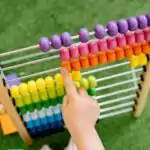
- Abacus – beads on rods used for counting and calculation.
- Napier’s bones – sticks inscribed with numbers for multiplication.
- Slide rule – used for multiplication, division, and roots.
Mechanical Counting and Calculating Devices
Mechanical devices were developed to improve accuracy and speed of calculations using gears and wheels.
Examples include:
- Pascal’s Calculator – invented by Blaise Pascal in 1642 to add and subtract.
- Leibniz Calculator – created by Gottfried Leibniz to multiply, divide, and find square roots.
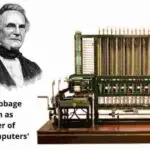
- Charles Babbage’s Difference Engine and Analytical Engine – considered the foundation of modern computers.
Electro-Mechanical Counting Devices
These devices combined electrical power with mechanical parts, allowing faster operations.
They include:
- Herman Hollerith’s Punch Card Machine – used in the 1890 U.S. census.
- Zuse Z3 – created by Konrad Zuse in 1941, the first programmable electromechanical computer.
Electronic Counting Devices and Modern Computer
The invention of electronic devices marked a major shift from mechanical to electronic components.
The following are examples:
- ENIAC – first general-purpose electronic computer built in 1946.
- UNIVAC – first commercial computer produced in the United States.
- Transistor Computers – replaced vacuum tubes and were smaller and more reliable.
- Integrated Circuits (ICs) – allowed for the third generation of computers.
- Microprocessors – led to the fourth generation of computers.
Modern Machines
Modern computers use advanced microprocessors and artificial intelligence to perform complex tasks.
They are:
- Faster, smaller, and more efficient.
- Used in education, medicine, communication, business, and entertainment.
- Include desktops, laptops, smartphones, and supercomputers.
Teaching Methods/Instructional Techniques:
Discussion, Lecture, Explanation, Storytelling, Demonstration, Group Work, Question and Answer, Use of Visual Aids
Instructional Procedures
To deliver this lesson, the teacher will adopt the following steps:
Step 1: Introduction
Time: 5 minutes
Teaching Skill: Set Induction
Teacher’s Activity: Teacher tells a short story about how people in ancient times used stones and fingers for counting, then connects it to the lesson.
Pupils’ Activity: Pupils listen attentively and share experiences of counting with simple objects.
Learning Point: Pupils become interested in how computers developed from simple counting tools.
Step 2: Early Counting Devices
Time: 8 minutes
Teaching Skill: Explanation
Teacher’s Activity: Teacher explains with charts and abacus how early counting devices were used.
Pupils’ Activity: Pupils observe and handle abacus if available.
Learning Point: Pupils learn the earliest forms of counting devices.
Step 3: Mechanical and Electro-Mechanical Devices
Time: 10 minutes
Teaching Skill: Storytelling and Discussion
Teacher’s Activity: Teacher narrates the contributions of Pascal, Leibniz, Hollerith, and Zuse, showing pictures of their machines.
Pupils’ Activity: Pupils listen and ask questions.
Learning Point: Pupils understand the development from mechanical to electro-mechanical machines.
Step 4: Electronic and Modern Computers
Time: 10 minutes
Teaching Skill: Explanation and Demonstration
Teacher’s Activity: Teacher explains electronic devices like ENIAC, UNIVAC, and modern machines, showing charts of generations of computers.
Pupils’ Activity: Pupils take notes and compare old computers with modern ones.
Learning Point: Pupils recognize how computers became faster and more efficient.
Step 5: Note-Taking
Time: 5 minutes
Teaching Skill: Reinforcement
Teacher’s Activity: Teacher dictates or writes the summarized content for pupils to copy.
Pupils’ Activity: Pupils copy notes into their exercise books.
Learning Point: Pupils have written notes on the historical development of computers.
Step 6: Evaluation/Review
Time: 5 minutes
Teaching Skill: Questioning
Teacher’s Activity: The teacher evaluates the learning by asking the following questions:
- Mention two examples of early counting devices.
- State two features of mechanical calculators.
- Who invented the punch card machine?
- Name one example of an electronic computer.
Pupils’ Activity: Pupils answer the questions orally.
Learning Point: Pupils demonstrate understanding of the stages of computer development.
Step 7: Conclusion
Time: 2 minutes
Teaching Skill: Reinforcement
Teacher’s Activity: Teacher summarizes the lesson and links it to future topics on computer generations.
Pupils’ Activity: Pupils listen and ask final questions.
Learning Point: Pupils appreciate the continuous improvement in computer technology.
Home Task: Record two correct examples of Historical Development Of Computers from the lesson or home environment and explain each in your own words.
Lesson Keywords
- Abacus – an early counting device with beads and rods
- Calculator – a device for arithmetic operations
- Punch Card – card with holes used to store data
- ENIAC – first general-purpose electronic computer
- Microprocessor – tiny chip that controls modern computers
Differentiation
The teacher will use visual aids for slower learners, provide simple explanations with examples, and assign group discussions where advanced learners explain concepts to peers.
Note for teachers using this lesson plan
Ensure pupils actively participate by handling an abacus or identifying modern machines they use daily. Simplify historical facts without losing accuracy.


Community Join the conversation Open discussion +