

Class: Primary Four
Term: First Term
Subject: Basic Science and Technology
Curriculum Theme: Computer Studies
Previous Lesson: Meaning and Sources of Data
Topic: Computer Hardware
Content/Learning Area: Defining computer hardware, Listing examples of computer hardware
Time Allocation: 40 minutes
Performance Objectives
By the end of the lesson, pupils should be able to:
- Cognitive Domain:
1. Define computer hardware.
2. List examples of computer hardware.
- Affective Domain:
1. show interest in learning about computer hardware.
- Psychomotor Domain:
1. Identify different computer hardware components.
- Social Domain:
1. Participate actively in class discussions.
Reference Materials
- 9 – Years Basic Education Curriculum
- Abuja Educational Resource Center Scheme of Work
- NAPPS National Unified scheme of work
- Relevant Textbooks
Instructional Materials
To deliver this lesson,the teacher will use the following materials:
- Whiteboard or chart
- Markers or chalk
- Pictures of computer hardware
- A real computer (if possible)
Rationale for the Lesson
Understanding computer hardware is essential to using computers effectively. This lesson provides a basic understanding,essential for future learning in computer studies and other technology-related subjects.
Prerequisite/Previous Knowledge
Pupils have basic knowledge of computers.
Lesson Content
Computer Hardware
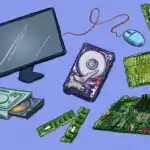
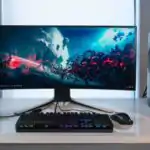
Computer hardware refers to the physical parts of a computer,such as the monitor,keyboard,and mouse.
What is Computer Hardware?
Computer hardware is the tangible, physical components of a computer system.These are the parts you can see and touch. They follow instructions from the software.
Examples of Computer Hardware
Examples are:
- Monitor: Displays computer output.
- Keyboard: Used for text and command input.
- Mouse: Controls the cursor and interacts with the computer.
- Printer: Prints documents and images.
- Central Processing Unit (CPU): The computer’s “brain,” processing details.
- Hard Disk Drive (HDD): Stores data and programs.
- Random Access memory (RAM): temporary memory for actively used data.
- Motherboard: Connects all components.
- Graphics Card: Processes and displays images.
- Sound Card: Plays sound.
- Network Card: Enables network connection.
- Speakers: Produce audio output.
- Webcam: Captures video and images.
- Scanner: Converts physical documents into digital format.
Teaching Methods
To deliver this lesson, the teacher will adopt the following methods: Discussion, Question and answer, Visual aids
Instructional Procedures
To deliver this lesson, the teacher will adopt the following steps:
Step 1: Introduction
Time: 5 minutes
teaching Skill: Set Induction
Teacher’s Activity: Ask students what they know about computers. Show pictures of computer hardware.
Pupils’ Activity: Answer questions and identify computer parts.
Step 2: Clarification of Key Concepts
Time: 10 minutes
Teaching Skill: Explaining
Teacher’s Activity: Define computer hardware and explain its importance.
Pupils’ Activity: Listen attentively and take notes.
Step 3: Demonstration/Guided practice
Time: 10 minutes
Teaching Skill: Demonstrating
teacher’s Activity: Show examples of computer hardware (if available) and explain their functions.
Pupils’ Activity: Observe and ask questions.
Step 4: Autonomous Practice
Time: 5 minutes
Teaching Skill: Monitoring
Teacher’s Activity: Guide pupils as they list examples of computer hardware.
Pupils’ Activity: List examples of computer hardware.
Step 5: Note-taking
Time: 5 minutes
Teaching Skill: Note-taking
Teacher’s Activity: Review key concepts and encourage note-taking.
Pupils’ Activity: Take notes on key concepts.
Step 6: Evaluation/Review
Time: 5 minutes
Teaching Skill: Questioning
Teacher’s Activity: Ask evaluation questions.
Pupils’ Activity: Answer evaluation questions.
Objective-aligned checks:
- Define computer hardware.
- List examples of computer hardware.
- show interest in learning about computer hardware.
Step 7: conclusion
Time: 2 minutes
Teaching Skill: Summarizing
Teacher’s Activity: Summarize the key concepts of computer hardware and assign homework.
Pupils’ Activity: Listen to the summary and note the homework assignment.
Lesson Keywords
- Hardware – The physical components of a computer system.
- Monitor – A display screen for viewing computer output.
- Keyboard – An input device for typing text and commands.
- Mouse – A pointing device for interacting with the computer.
- CPU – The central processing unit, the “brain” of the computer.
- RAM – random Access Memory, temporary memory for active data.
- HDD – Hard Disk Drive, storage device for data and programs.
Lesson Evaluation
To evaluate the learning, the teacher asks pupils to:
- What are the physical parts of a computer called?
- Name five examples of computer hardware.
- Why is understanding computer hardware crucial?
- What does the CPU do?
- What’s the difference between RAM and HDD?
Assignment/Homework
- Draw and label different computer hardware components.
- List five additional examples of computer hardware not mentioned in class.
- Explain the function of each hardware component you listed.
Differentiation
- For slower learners: Provide one-on-one assistance and use simpler language.
- For advanced learners: Encourage them to research additional computer hardware components.
- For visual/auditory/kinesthetic learners: Use visual aids, verbal explanations, and hands-on activities to cater to different learning styles.
Note for Teachers
Ensure to use real-life examples and visual aids to enhance understanding. Encourage active participation and provide constructive feedback to pupils.
Community Join the conversation Open discussion +