

Class: Primary Four
Term: First Term
Subject: Basic Science and Technology
Curriculum Theme: Computer Studies
Previous Lesson:
Topic: Printers
Content/Learning Area: Defining a printer, stating uses of a printer, drawing a printer
Time Allocation: 40 minutes
Performance Objectives
By the end of the lesson, pupils should be able to:
- Cognitive Domain:
1. Define a printer.
2. State at least two uses of a printer.
3. Explain how a printer works.
- Psychomotor Domain:
1. Draw a printer.
- Affective Domain:
1. Show interest in learning about printers.
2. Appreciate the importance of printers in daily life.
- Social Domain:
1. Participate actively in class discussions.
2. work cooperatively with peers.
Reference Materials
- 9 – Years basic Education Curriculum
- Abuja Educational resource Center Scheme of work
- NAPPS National Unified Scheme of Work
- Online Details
- Relevant Textbooks
Instructional Materials
To deliver this lesson, the teacher will employ the help of the following materials:
- Whiteboard or chart paper
- Markers or crayons
- Pictures of different types of printers
- A working printer (optional)
Rationale for the Lesson
Understanding printers is crucial for pupils to grasp the concept of output devices and how technology facilitates information transfer, which will be beneficial in future computer studies and everyday life.
Prerequisite/Previous Knowledge
The teacher will start by asking pupils what they already know about computers and how we get information from them onto paper. A brief discussion will follow, leading into the introduction of printers.
Lesson Content
Printer
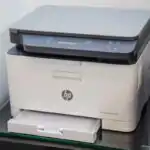
A printer is a computer device that makes a physical copy of digital documents, images, or graphics. It takes electronic data from a computer and turns it into printed output on paper.
Uses of a Printer
Printers have many uses:
Printing School Assignments
- Printers create hard copies of homework,essays,and othre school assignments.
Creating Art Projects
- Printers allow us to print images and designs for art projects,helping us be creative.
These include:
- Printing study materials, notes, and worksheets for students.
- Making personal photo prints of memories.
- Printing labels and stickers for projects.
- Printing business documents like invoices and reports.
- Printing tickets and passes for events.
- Printing posters and banners for events and advertising.
- Printing maps and directions for navigation.
Printer Types and Print Choices
Inkjet printers use liquid ink and are common for colour images; laser printers use powdered toner and are often fast for text. Some printers can scan or copy, but those are extra functions.
Print preview prevents waste. Choose paper size, page range, colour or black-and-white, number of copies and page orientation. A printer is an output device, while a scanner sends input into the computer.
Teaching Methods
To deliver this lesson, the teacher will adopt the following methods: Discussion, Presentation, Question and Answer, Drawing.
Instructional procedures
To deliver this lesson, the teacher will adopt the following steps:
Step 1: Introduction
Time: 5 minutes
Teaching Skill: Set Induction
Teacher’s Activity: Asks pupils what they know about getting information from computers onto paper and introduces the topic: Printers.
Pupils’ activity: Share their prior knowledge and listen attentively.
Step 2: Clarification of Key Concepts
Time: 10 minutes
Teaching Skill: Description
teacher’s activity: Defines a printer and explains its function and shows pictures of different printers.
Pupils’ Activity: Listen attentively and ask clarifying questions.
Step 3: Demonstration/Guided Practice
Time: 10 minutes
Teaching Skill: Demonstration
teacher’s Activity: (If possible) Demonstrates a printer in action and guides pupils in drawing a simple printer.
Pupils’ Activity: Observe the demonstration and follow the teacher’s instructions to draw a printer.
Step 4: Self-reliant Practice
Time: 5 minutes
Teaching Skill: Independent Practice
Teacher’s Activity: Pupils draw their own printers.
Pupils’ Activity: Draw a printer independently.
Step 5: Note-Taking
Time: 5 minutes
Teaching Skill: Note-Taking
Teacher’s Activity: Guides pupils in writng key points about printers in their notebooks.
Pupils’ Activity: Write notes.
Step 6: Evaluation/Review
Time: 5 minutes
Teaching Skill: Questioning
Teacher’s Activity: Asks evaluation questions to assess understanding.
pupils’ Activity: Answer the evaluation questions.
Objective-aligned checks:
- Define a printer.
- State at least two uses of a printer.
- Explain how a printer works.
Step 7: Conclusion
Time: 5 minutes
Teaching Skill: Summarization
Teacher’s Activity: Summarizes the key points about printers and their uses, emphasizing their importance in our daily lives and encourages pupils to continue exploring technology.
Pupils’ Activity: Listen attentively and ask any remaining questions.
Lesson Keywords
- Printer – A device that produces a hard copy of digital documents.
- Output Device – A device that displays or produces information from a computer.
- Hard Copy – A printed version of digital data.
- Ink Cartridge – A container that holds ink for printing.
- Print Resolution – The quality and detail of a printed image.
Lesson Evaluation
To evaluate the learning, the teacher asks pupils to:
- What is a printer and what does it do?
- Name two ways we use printers.
- Draw a printer.
Assignment/Homework
- List five different types of documents you can print using a printer.
- Research and write a short paragraph about the history of printers.
- Draw and label the main parts of a printer.
Differentiation
- For slower learners: Provide one-on-one assistance and simpler drawing activities.
- For advanced learners: Introduce different types of printers and their features.
- For visual/auditory/kinesthetic learners: Use visual aids, verbal explanations, and hands-on activities to cater to different learning styles.
note for Teachers
Ensure to have visual aids and a working printer (if available) to enhance the lesson. Encourage pupils to ask questions and participate actively in discussions.


Community Join the conversation Open discussion +