

Class: Junior Secondary School 3 (JSS 3 / JS3)
Term: Third Term
Week: 6
Age: 14 years
Duration: 45 minutes
Subject: Business Studies
Curriculum Theme: Business Studies
Previous Lesson: Correct Keyboarding Techniques: The Keyboard Rows.
Topic: ALPHANUMERIC KEYS
Subject Matter: Alpha numeric keys, Identification, Soft touch manipulation, Correct finger placement on the basic service keys on the computer keyboard
Specific Objectives
By the end of the lesson, pupils should be able to:
Cognitive Domain:
- Define alphanumeric keys.
- Identify various alphanumeric keys on a computer keyboard.
Affective Domain:
- Appreciate the importance of proper typing techniques for efficiency.
- Develop an interest in practicing keyboarding skills.
Psychomotor Domain:
- Demonstrate soft touch manipulation when typing.
- Correctly place fingers on the basic service keys (home row) of the computer keyboard.
Social Domain:
- Work cooperatively with peers to practice keyboard finger placement.
- Participate actively in classroom discussions about keyboarding.
Reference Materials
The following resources were used in planning this lesson:
- 9 Years Basic Education Curriculum
- Senior Secondary Schools Education Curriculum
- State Unified Scheme of Work
- Anyanwuocha, R.A. (2018). Essential Business Studies for Junior Secondary Schools 3. Tonad Publishers.
- https://www.study.com
- https://www.teach-nology.com
Instructional Materials
The teacher will teach this lesson with the aid of:
- A physical computer keyboard
- A chart showing the layout of a computer keyboard
- Diagrams illustrating correct finger placement on the home row keys
- Projector (optional)
Rationale for the Lesson
Understanding alphanumeric keys and proper typing techniques helps pupils develop essential computer literacy skills. This lesson enables pupils to type efficiently and accurately, which is important for academic work and future careers in a technology-driven world.
Prerequisite/Previous Knowledge
Pupils have basic knowledge of a computer and its major parts, including the keyboard.
Lesson Content/Board Summary
ALPHANUMERIC KEYS
What are Alphanumeric Keys?
Alphanumeric keys are the keys on a computer keyboard that include letters (A-Z), numbers (0-9), and common symbols (like !, @, #, $, %, ^, &, *, (, )). These keys are used for typing text, numbers, and basic characters.
Identification of Alphanumeric Keys
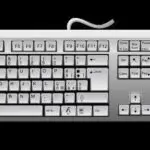
The alphanumeric section of the keyboard is the largest part, located in the center. It contains:
- Alphabet Keys: All the letter keys from A to Z.
- Numeric Keys: The number keys from 0 to 9, usually found above the alphabet keys.
- Symbol Keys: Keys like comma (,), period (.), question mark (?), exclamation mark (!), at sign (@), hash (#), dollar sign ($), percentage (%), ampersand (&), asterisk (*), parentheses (()), etc.
Soft Touch Manipulation
Soft touch manipulation, also known as touch typing, is a typing technique where the typist uses all fingers without looking at the keyboard. It involves pressing the keys lightly and quickly, using only the necessary force to register the key press. This technique helps in increasing typing speed and accuracy while reducing strain on the fingers and wrists.
Correct Finger Placement on Basic Service Keys (Home Row)
The basic service keys, or home row keys, are the central row of keys where fingers rest when not actively typing. For the left hand, these keys are A, S, D, F. For the right hand, they are J, K, L, and the semicolon (;). The thumbs rest on the spacebar.
- Left Hand:
- Little finger on ‘A’
- Ring finger on ‘S’
- Middle finger on ‘D’
- Index finger on ‘F’
- Right Hand:
- Index finger on ‘J’
- Middle finger on ‘K’
- Ring finger on ‘L’
- Little finger on ‘;’ (semicolon)
- Thumbs: Both thumbs rest lightly on the spacebar.
From these home row positions, fingers extend to reach other keys, returning to the home row after each key press.
Teaching Methods/Instructional Techniques
Discussion, Lecture, Demonstration, Question and Answer, Visual Aids
Instructional Procedures
Step 1: Introduction
Time: 5 minutes
Teaching Skill: Set Induction
Teacher’s Activity: The teacher greets the pupils, reviews the previous lesson briefly, and then introduces the topic “Alphanumeric Keys” by asking pupils to identify keys they use most often on a keyboard.
Pupils’ Activity: Pupils respond to the greeting, recall the previous lesson, and identify common keys like letter keys and number keys.
Learning Point: Pupils are prepared for the new lesson and connect it to their existing knowledge.
Step 2: Explanation of Alphanumeric Keys
Time: 7 minutes
Teaching Skill: Explanation/Definition
Teacher’s Activity: The teacher defines alphanumeric keys, explaining that they include letters, numbers, and symbols. The teacher uses a keyboard chart to point them out.
Pupils’ Activity: Pupils listen attentively, observe the keyboard chart, and ask questions for clarification.
Learning Point: Pupils understand the definition and composition of alphanumeric keys.
Step 3: Identification of Alphanumeric Keys
Time: 7 minutes
Teaching Skill: Identification/Demonstration
Teacher’s Activity: The teacher displays a physical keyboard and guides pupils to identify specific letter, number, and symbol keys. The teacher asks pupils to name some examples.
Pupils’ Activity: Pupils identify and name various alphanumeric keys on the keyboard as guided by the teacher.
Learning Point: Pupils can correctly identify alphanumeric keys on a keyboard.
Step 4: Demonstration of Soft Touch Manipulation
Time: 7 minutes
Teaching Skill: Demonstration/Modeling
Teacher’s Activity: The teacher explains the concept of soft touch manipulation and demonstrates how to press keys lightly and quickly without looking at the fingers. The teacher emphasizes efficiency and reduced strain.
Pupils’ Activity: Pupils observe the teacher’s demonstration carefully and listen to the explanation.
Learning Point: Pupils understand what soft touch manipulation means and its benefits.
Step 5: Practice Soft Touch Manipulation
Time: 6 minutes
Teaching Skill: Guided Practice
Teacher’s Activity: The teacher guides pupils to practice soft touch manipulation on their desks (imagining a keyboard) or on available keyboards, encouraging them to press keys lightly.
Pupils’ Activity: Pupils attempt to practice soft touch manipulation, focusing on light and quick presses under the teacher’s guidance.
Learning Point: Pupils begin to develop the physical skill of soft touch typing.
Step 6: Correct Finger Placement on Basic Service Keys
Time: 6 minutes
Teaching Skill: Instruction/Demonstration
Teacher’s Activity: The teacher explains the home row keys (A S D F J K L 😉 and demonstrates the correct finger placement for both hands, emphasizing that fingers return to these positions after striking other keys.
Pupils’ Activity: Pupils observe the demonstration and then attempt to place their fingers correctly on the home row keys on their desks or keyboards.
Learning Point: Pupils learn and practice the correct home row finger placement.
Step 7: Evaluation/Review
Time: 5 minutes
Teaching Skill: Questioning/Assessment
Teacher’s Activity: The teacher evaluates the learning by asking the following questions:
- What are alphanumeric keys?
- Give three examples of alphanumeric keys.
- Explain what is meant by “soft touch manipulation” in typing.
- Identify the home row keys for the left hand.
Pupils’ Activity: Pupils answer orally and in writing.
Learning Point: Pupils demonstrate understanding of the lesson.
Step 8: Conclusion
Time: 2 minutes
Teaching Skill: Summarization
Teacher’s Activity: The teacher summarizes the key learning points about alphanumeric keys, soft touch manipulation, and correct finger placement. The teacher then gives pupils an assignment to practice home row finger placement at home.
Pupils’ Activity: Pupils listen to the summary and note down the assignment.
Learning Point: The lesson is concluded, and pupils are given a task to reinforce learning.
Lesson Keywords
- Alphanumeric – Keys that include letters, numbers, and symbols.
- Keyboard – An input device used to enter text and characters into a computer.
- Soft touch – A typing technique involving light and quick key presses.
- Home row – The central row of keys where fingers rest (ASDF JKL;).
- Typing – The process of writing using a keyboard.
Differentiation
For pupils who are struggling, the teacher will provide more one-on-one guidance during practice sessions and use larger visual aids. Advanced pupils will be encouraged to practice typing short sentences using the learned techniques and explore the numeric keypad.
Note for teachers using this lesson plan
Ensure that pupils have access to either real keyboards or clear keyboard diagrams for effective practical demonstration and practice. Emphasize the importance of correct posture alongside finger placement. Encourage consistent practice to build muscle memory for touch typing.

Community 1 comment Open discussion +