

Class: Junior Secondary School 3 (JSS3, JSS 3)
Term: 1st Term
Week: 2
Age: 14 years
Duration: 45 minutes
Subject: Mathematics
Curriculum Theme: Mathematics
Previous Lesson: Addition, Subtraction, Multiplication and Division of Binary Numbers
Topic: Binary Numbers (Part 2)
Subject Matter: Conversion from base ten to binary, Conversion from binary to other bases, Applying binary numbers as two-way classification system using punch card, Using computer to do simple mathematical calculations.
Specific Objectives
By the end of the lesson, pupils should be able to:
- Cognitive Domain:
(a) Convert numbers from base ten to binary correctly.
(b) Convert binary numbers to other bases accurately.
(c) Explain the application of binary numbers in computer systems and punch cards. - Affective Domain:
(a) Appreciate the importance of binary numbers in computer operations and modern technology. - Psychomotor Domain:
(a) Perform step-by-step conversions and demonstrate binary addition using examples. - Social Domain:
(a) Work collaboratively in pairs or groups to solve binary conversion problems.
Reference Materials
The following resources was used in planning this lesson:
- 9 Years Basic Education Curriculum
- Lagos State Unified Scheme of work for Junior Secondary Schools
- Wikipedia – Binary number
- Relevant Textbooks
Instructional Materials
The teacher will teach this lesson with the aid of:
- Number base conversion charts
- Flash cards of binary and decimal numbers
- Computer or calculator for demonstration
- Binary punch card samples or printed diagrams
- Whiteboard and markers
Rationale for the Lesson
This lesson helps students understand how binary numbers are used in digital systems, computer operations, and data representation, improving logical and computational reasoning skills.
Prerequisite/Previous Knowledge
Pupils are familiar with the concept of number bases and have previously learned how to identify and represent binary numbers from earlier lessons.
Lesson Content/Board Summary
Binary Numbers
Conversion and Application of Binary Numbers
Converting a base ten (decimal) number to binary involves dividing the number by 2 repeatedly until the quotient is zero and recording the remainders. The binary number is then obtained by reading the remainders from bottom to top.
Example 1:
Convert 25 to binary.
25 ÷ 2 = 12 remainder 1
12 ÷ 2 = 6 remainder 0
6 ÷ 2 = 3 remainder 0
3 ÷ 2 = 1 remainder 1
1 ÷ 2 = 0 remainder 1
Answer: Reading from bottom to top gives 11001₂
Example 2:
Convert 45 to binary.
45 ÷ 2 = 22 R1
22 ÷ 2 = 11 R0
11 ÷ 2 = 5 R1
5 ÷ 2 = 2 R1
2 ÷ 2 = 1 R0
1 ÷ 2 = 0 R1
Answer: Binary = 101101₂
Conversion from Binary to Other Bases
Binary numbers can be converted to other bases such as octal (base 8) or hexadecimal (base 16) by grouping the binary digits in sets.
The following are the basic steps:
- For binary to octal, group digits in threes from right to left.
- For binary to hexadecimal, group digits in fours from right to left.
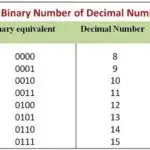
- Convert each group to its base 8 or base 16 equivalent using conversion charts.
Example:
Convert 1101011₂ to octal.
Group in threes → (1)(101)(011)
Add zeros to make groups complete → 001 101 011
Convert → 1, 5, 3
Answer: (153)₈
Applying Binary Numbers as Two-Way Classification System Using Punch Card
Binary numbers are used for two-way classification, meaning they can represent two possible states: 0 (off) or 1 (on). In early computing, punch cards used holes to represent 1 and no holes for 0.
The following are the applications of binary in punch cards:
- Identification of data using holes (1) and blanks (0).
- Storage of information for computer input.
- Processing of simple classification systems such as yes/no, true/false, or on/off.
Using Computer to Do Simple Mathematical Calculations
Computers use binary arithmetic to perform all calculations. Addition, subtraction, multiplication, and division are done using 0s and 1s.
Example 1: Binary Addition
Add 1011₂ + 1101₂
   1011
+  1101
= 11000₂
Example 2: Binary Subtraction
Subtract 1010₂ – 0111₂
   1010
-  0111
= 0011₂
Computers carry out these binary operations at great speed to process data and execute programs efficiently.
Teaching Methods/Instructional Techniques:
Lecture, Explanation, Demonstration, Discussion, Group Work, Question and Answer, Problem Solving
Instructional Procedures
To deliver this lesson, the teacher will adopt the following steps:
Step 1: Introduction
Time: 5 minutes
Teaching Skill: Set Induction
Teacher’s Activity: Teacher reviews the previous lesson on the concept of binary numbers and asks pupils how binary differs from decimal numbers.
Pupils’ Activity: Pupils respond and recall previous lesson content.
Learning Point: Pupils understand the link between previous and current lesson topics.
Step 2: Conversion from Base Ten to Binary
Time: 10 minutes
Teaching Skill: Explanation
Teacher’s Activity: Teacher explains and demonstrates step-by-step conversion from base ten to binary using board examples.
Pupils’ Activity: Pupils observe, take notes, and practice the examples.
Learning Point: Pupils learn how to convert base ten numbers to binary.
Step 3: Conversion from Binary to Other Bases
Time: 10 minutes
Teaching Skill: Demonstration
Teacher’s Activity: Teacher demonstrates how to convert binary to octal and hexadecimal using groupings and charts.
Pupils’ Activity: Pupils perform similar conversions in groups.
Learning Point: Pupils understand conversion between binary and other bases.
Step 4: Application of Binary and Computer Calculations
Time: 10 minutes
Teaching Skill: Discussion and Demonstration
Teacher’s Activity: Teacher explains binary applications using punch card samples and demonstrates binary addition using a chart or computer.
Pupils’ Activity: Pupils participate, ask questions, and perform sample binary additions.
Learning Point: Pupils understand binary application in computing and data classification.
Step 5: Note-Taking
Time: 5 minutes
Teaching Skill: Explanation
Teacher’s Activity: Teacher dictates or writes the board summary for pupils to copy.
Pupils’ Activity: Pupils write notes neatly into their notebooks.
Learning Point: Pupils have accurate records of the lesson content.
Step 6: Evaluation/Review
Time: 3 minutes
Teaching Skill: Questioning
Teacher’s Activity: The teacher evaluates the learning by asking the following questions:
- Convert 22₁₀ to binary.
- Convert 101101₂ to octal.
- What do 0 and 1 represent in a punch card system?
- Add 111₂ + 101₂.
Pupils’ Activity: Pupils answer questions orally and on the board.
Learning Point: Pupils demonstrate mastery of binary conversion and its application.
Step 7: Conclusion
Time: 2 minutes
Teaching Skill: Reinforcement
Teacher’s Activity: Teacher summarizes key points, reinforces correct steps, and gives a short assignment on conversions.
Pupils’ Activity: Pupils listen attentively and note the assignment.
Learning Point: Pupils consolidate their understanding of binary operations and conversions.
Lesson Keywords
- Binary – number system using only 0 and 1
- Conversion – process of changing a number from one base to another
- Octal – number system with base 8
- Hexadecimal – number system with base 16
- Punch Card – a card with holes representing data in binary form
Differentiation
Teacher provides additional guidance and visual aids for slower learners, while faster learners handle more complex binary-to-hexadecimal conversions.
Note for teachers using this lesson plan
Ensure adequate practice for students on base conversions. Reinforce understanding with group exercises and use computer demonstrations for engagement.


Community Join the conversation Open discussion +