

Note for teachers using this lesson plan
This lesson introduces students to the concepts of 3D modelling and Paint 3D, a user-friendly application for creating 3D objects. Ensure that digital devices with Paint 3D installed and internet access are available for practical activities. Guide students through defining key terms and exploring the practical applications of 3D modelling. By the end of the lesson, students should be able to clearly define 3D modelling and Paint 3D, and list various uses of 3D modelling in real-world scenarios.
Class: JSS 1
Term: First Term
Week: 7
Age: 12 years
Duration: 45 minutes
Subject: Digital Technologies
Curriculum Theme: Basic computer operations
Focal competence: Using simple modelling application
Key competencies/values: Creativity and innovation; Information literacy
Skills:
- Using 3D modelling to create images
Previous Lesson: MS PowerPoint, Its Purpose and User Interface
Topic: 3D Modelling With Paint 3D
Subject Matter: Meaning of 3D modelling, Meaning of Paint 3D, Meaning and uses of 3D modelling
Specific Objectives
By the end of the lesson, pupils/students should be able to:
Cognitive Domain
- Define 3D modelling.
- Define Paint 3D.
- State at least three uses of 3D modelling.
Affective Domain
- Appreciate the importance of 3D modelling in various fields.
- Show interest in exploring 3D design applications.
Psychomotor Domain
- Describe 3D modelling and its uses.
Reference Materials
The following resources were used in planning this lesson:
- 2025 Revised 9 Years Basic Education Curriculum
- Relevant State Unified Scheme of Work
- Digital Technologies for Junior Secondary Schools 1 textbook
- The HeadTeacher Scheme of work
Instructional Materials
The teacher will teach this lesson with the aid of:
- Digital devices (computers, laptops, tablets) installed with Paint 3D
- Internet access
- Projector or interactive whiteboard (optional)
- Whiteboard and markers
- Charts showing examples of 3D models
Rationale for the Lesson
This lesson introduces students to the exciting world of 3D modelling, a fundamental skill in digital design and technology. Understanding 3D modelling and tools like Paint 3D helps students develop creativity and problem-solving skills, preparing them for future careers in design, engineering, and entertainment. It also enhances their digital literacy by familiarizing them with practical applications of computer software.
Prerequisite/Previous Knowledge
Students should have basic knowledge of computer operations, including how to open and close applications, use a mouse, and navigate simple interfaces.
Lesson Content/Board Summary
3D Modelling With Paint 3D
Meaning of 3D Modelling
3D modelling is the process of creating a three-dimensional representation of an object or shape using specialized software. These models can be viewed from all angles (length, width, and depth) and are used in various fields to visualize designs, characters, or environments.
Meaning of Paint 3D
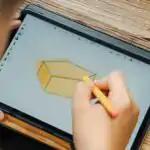
Paint 3D is a free, easy-to-use 3D modelling application developed by Microsoft. It allows users to create 3D objects, doodle in 3D, and combine 2D images with 3D models. It is a good starting point for beginners to explore 3D design without needing complex software.
Uses of 3D Modelling
3D modelling has many practical uses across different industries. Some common uses include:
- Architecture and Construction: Architects use 3D models to design buildings, visualize floor plans, and present designs to clients. It helps in planning and identifying potential issues before construction begins.
- Engineering and Product Design: Engineers use 3D modelling to design and test products, from car parts to electronic gadgets. This helps in creating prototypes, analyzing functionality, and making improvements.
- Gaming and Entertainment: 3D models are essential for creating characters, environments, and objects in video games, animated movies, and virtual reality experiences.
- Medical Field: Doctors and researchers use 3D models of organs and body parts for surgical planning, medical training, and creating prosthetic limbs.
- Education: 3D models are used in classrooms to create interactive learning experiences, allowing students to explore complex concepts visually, such as the human anatomy or historical artifacts.
- Advertising and Marketing: Companies use 3D models to create realistic product visualizations for advertisements, enabling customers to see products from all angles before purchasing.
- 3D Printing: 3D models are the basis for 3D printing, where digital designs are turned into physical objects layer by layer. This is used for rapid prototyping, creating custom parts, and even art.
Teaching Methods/Instructional Techniques
Discussion, Demonstration, Guided Practice, Question and Answer, Explanation, Observation, Group Work, Practical Activity.
Instructional Procedures
Step 1: Introduction
Time: 5 minutes
Teaching Skill: Elicitation
Teacher’s Activity: The teacher greets the students and asks them if they know what 3D means or if they have seen any 3D images or movies. The teacher then introduces the topic: “3D Modelling With Paint 3D”.
Pupils’ Activity: Students respond to the teacher’s questions and listen attentively to the introduction.
Learning Point: Introduction to 3D concepts
Step 2: Meaning of 3D Modelling
Time: 8 minutes
Teaching Skill: Explanation/Definition
Teacher’s Activity: The teacher explains the meaning of 3D modelling, emphasizing the three dimensions (length, width, depth) and showing examples of 3D models on charts or a projector. The teacher defines 3D modelling as the process of creating a three-dimensional representation of an object using software.
Pupils’ Activity: Students listen, observe the examples, and ask questions for clarification.
Learning Point: Definition of 3D modelling
Step 3: Meaning of Paint 3D
Time: 7 minutes
Teaching Skill: Discussion/Demonstration
Teacher’s Activity: The teacher discusses the meaning of Paint 3D, explaining that it is a user-friendly application for 3D design. If possible, the teacher demonstrates how to open Paint 3D and briefly shows its interface.
Pupils’ Activity: Students participate in the discussion, observe the demonstration, and identify Paint 3D as a 3D design tool.
Learning Point: Understanding Paint 3D
Step 4: Introduction to Uses of 3D Modelling
Time: 5 minutes
Teaching Skill: Questioning/Brainstorming
Teacher’s Activity: The teacher asks students to brainstorm where they think 3D models might be used in the real world. The teacher guides them to think about movies, games, buildings, etc.
Pupils’ Activity: Students share their ideas and contribute to the brainstorming session.
Learning Point: Initial ideas for 3D uses
Step 5: Exploring Uses of 3D Modelling (Group Activity)
Time: 8 minutes
Teaching Skill: Guided Research/Collaboration
Teacher’s Activity: The teacher divides students into small groups and instructs them to use available digital devices and internet access to search for various uses of 3D modelling. Each group should note down at least three different uses.
Pupils’ Activity: Students work in groups, use the internet to research, and identify different applications of 3D modelling.
Learning Point: Discovering 3D modelling applications
Step 6: Presentation and Discussion of Uses
Time: 4 minutes
Teaching Skill: Facilitation/Reinforcement
Teacher’s Activity: The teacher invites each group to present one or two uses they found. The teacher then consolidates the information, listing and briefly explaining the main uses of 3D modelling on the board.
Pupils’ Activity: Groups present their findings, and students listen and contribute to the class discussion.
Learning Point: Stating and explaining 3D uses
Step 7: Evaluation/Review
Time: 5 minutes
Teaching Skill: Questioning/Assessment
Teacher’s Activity: The teacher evaluates the learning by asking the following questions:
- What is 3D modelling?
- What is Paint 3D?
- Mention three uses of 3D modelling.
- Describe 3D modelling and its uses.
Pupils’ Activity: Pupils answer orally and in writing.
Learning Point: Assessment of understanding
Step 8: Note-Taking
Time: 4 minutes
Teaching Skill: Guided Writing
Teacher’s Activity: The teacher guides pupils/students to copy the essential Board Summary notes into their notebooks, specifically the meanings of 3D modelling, Paint 3D, and the list of uses.
Pupils’ Activity: Pupils/students copy the notes carefully into their notebooks.
Learning Point: Recording lesson content
Step 9: Conclusion
Time: 2 minutes
Teaching Skill: Summarization
Teacher’s Activity: The teacher briefly summarizes the key points of the lesson, reiterating the importance of 3D modelling in the digital world and encouraging students to explore Paint 3D further.
Pupils’ Activity: Students listen to the summary and prepare for the next lesson.
Learning Point: Lesson recap and closure
Continuous Assessment/Further Study
Type: Homework
Instruction: Answer the following questions in your Digital Technologies notebook:
- In your own words, explain what 3D modelling is.
- List five real-world applications of 3D modelling that were not discussed in class, and briefly explain one.
- If you have access to a computer, try to open Paint 3D and identify at least three tools you see in the application.
Lesson Keywords
- 3D Modelling – The process of creating a three-dimensional digital representation of an object.
- Paint 3D – A free Microsoft application used for creating 3D objects and designs.
- Dimensions – Measurements of length, width, and depth.
- Prototype – An early sample or model of a product built to test a concept or process.
- Virtual Reality (VR) – A simulated experience that can be similar to or completely different from the real world.
Differentiation
For weaker learners, provide simplified definitions and focus on identifying just two or three key uses of 3D modelling. For faster learners, encourage them to explore more advanced features of Paint 3D (if available) or research specific industries that heavily rely on 3D modelling, such as game development or animation.
Suggested Lesson Videos
For further understanding, students can search for:
Teacher Guide for Using This Lesson Plan
Before the lesson, ensure that all digital devices are charged and Paint 3D is installed and functional. Test internet connectivity for the group activity. Begin by engaging students with questions about 3D concepts they might already know. Clearly explain the definitions of 3D modelling and Paint 3D, using visual aids like charts or a projector. The group activity for researching uses of 3D modelling is crucial for active learning; monitor groups and provide guidance as needed. After presentations, consolidate the uses on the board for clarity. Guide students to copy the Board Summary notes during the note-taking stage. For weaker learners, simplify explanations and provide direct examples. Encourage faster learners to delve deeper into specific applications or try basic 3D creation in Paint 3D if time permits. Conclude by reinforcing the lesson’s main points and encouraging further exploration.

Community Join the conversation Open discussion +