

Class: Junior Secondary School 2 (JSS2, JSS 2)
Term: 1st Term
Week: 2
Age: 13 years
Duration: 45 minutes
Subject: Basic Science And Technology
Curriculum Theme: Computer Studies
Previous Lesson: Classification of Computers by Sizes, Generations, and Versatility
Topic: The Computer System
Subject Matter: Components of computer system: Hardware, Software, People ware.
Specific Objectives
By the end of the lesson, pupils should be able to:
- Cognitive Domain:
(a) Identify and describe the components of a computer system.
(b) Differentiate between hardware, software, and peopleware. - Affective Domain:
(a) Appreciate the importance of each component in the functioning of the computer system. - Psychomotor Domain:
(a) Demonstrate the ability to identify hardware parts on a real computer.
(b) Practice using simple software applications under guidance. - Social Domain:
(a) Work cooperatively in groups to classify computer system components correctly.
Reference Materials
The following resources was used in planning this lesson:
- 9 Years Basic Education Curriculum
- Lagos State Unified Scheme of work for Junior Secondary Schools
- Britannica – “Computer: Components and Functions” (https://www.britannica.com/technology/computer)
- Relevant Textbooks
Instructional Materials
The teacher will teach this lesson with the aid of:
- A real computer system (desktop or laptop)
- Charts showing labeled parts of a computer
- Projector or flashcards for software examples
- Pictures of different computer users in action
- Whiteboard and markers
Rationale for the Lesson
This lesson helps pupils understand the interdependence of hardware, software, and peopleware, which are the key elements that make the computer system function effectively.
Prerequisite/Previous Knowledge
Pupils already know the basic uses of a computer system from their JSS 1 Computer Studies lessons and may have had informal exposure to using computers at school or at home.
Lesson Content/Board Summary
The Computer System
A computer system is made up of different components that work together to perform tasks. These components include hardware, software, and peopleware.
Hardware
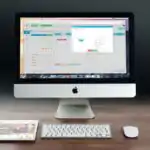
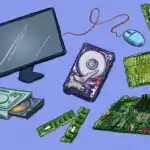
Hardware refers to the physical parts of the computer that can be seen and touched. These include both input, output, and storage devices.
The following are examples of hardware:
- Monitor
- Keyboard
- Mouse
- Central Processing Unit (CPU)
- Printer
- Scanner
- Hard disk drive
- Flash drive
Software
Software refers to the set of instructions, programs, and applications that tell the computer what to do. It cannot be touched physically but it makes the hardware useful.
The following are examples of software:
- Operating System (e.g. Windows, Linux)
- Word Processing programs (e.g. Microsoft Word)
- Spreadsheet programs (e.g. Excel)
- Database applications (e.g. Access)
- Web browsers (e.g. Chrome, Firefox)
- Antivirus programs
Peopleware
Peopleware refers to the human beings who use the computer system and give it instructions to perform tasks. They are important because without people, the computer cannot function usefully.
The following are examples of peopleware:
- Computer users
- Programmers
- System analysts
- Computer operators
- Network administrators
- IT support staff
Teaching Methods/Instructional Techniques:
Lecture, Discussion, Explanation, Demonstration, Group Work, Question and Answer, Visual Aids
Instructional Procedures
To deliver this lesson, the teacher will adopt the following steps:
Step 1: Introduction
Time: 5 minutes
Teaching Skill: Set Induction
Teacher’s Activity: Teacher asks pupils questions about how they use a computer and what they think makes it work.
Pupils’ Activity: Pupils respond by mentioning parts or experiences with computers.
Learning Point: Pupils are prepared and motivated to learn about computer components.
Step 2: Hardware
Time: 10 minutes
Teaching Skill: Explanation
Teacher’s Activity: Teacher explains and shows examples of hardware parts using real computer and charts.
Pupils’ Activity: Pupils observe, take notes, and identify the hardware parts.
Learning Point: Pupils understand hardware as the physical parts of a computer.
Step 3: Software
Time: 10 minutes
Teaching Skill: Demonstration
Teacher’s Activity: Teacher explains software and demonstrates how software like Word or Paint runs on the computer.
Pupils’ Activity: Pupils watch the demonstration and mention examples of software.
Learning Point: Pupils understand that software gives instructions to hardware.
Step 4: Peopleware
Time: 10 minutes
Teaching Skill: Discussion
Teacher’s Activity: Teacher explains peopleware and discusses different categories of computer users and specialists.
Pupils’ Activity: Pupils contribute by identifying people they know who use computers.
Learning Point: Pupils understand the importance of human beings in making computer systems useful.
Step 5: Note-Taking
Time: 5 minutes
Teaching Skill: Explanation
Teacher’s Activity: Teacher writes the board summary for pupils to copy.
Pupils’ Activity: Pupils write notes in their exercise books.
Learning Point: Pupils have a written record of the lesson.
Step 6: Evaluation/Review
Time: 3 minutes
Teaching Skill: Questioning
Teacher’s Activity: The teacher evaluates the learning by asking the following questions:
- Mention four examples of hardware.
- What is software? Give two examples.
- Who are peopleware? Mention two examples.
Pupils’ Activity: Pupils respond orally.
Learning Point: Pupils demonstrate their understanding of the lesson.
Step 7: Conclusion
Time: 2 minutes
Teaching Skill: Reinforcement
Teacher’s Activity: Teacher summarizes the components of the computer system and emphasizes their interdependence.
Pupils’ Activity: Pupils listen attentively.
Learning Point: Pupils appreciate the relationship between hardware, software, and peopleware.
Lesson Keywords
- Hardware – physical parts of a computer
- Software – instructions/programs that control the computer
- Peopleware – the people who use and manage the computer system
- CPU – Central Processing Unit, the brain of the computer
- Programmer – a person who writes computer programs
Differentiation
Teacher supports slower learners by using real objects and simple demonstrations, while faster learners are encouraged to classify more examples and explain functions.
Note for teachers using this lesson plan
Ensure that pupils handle hardware devices carefully. Use real-life demonstrations to make the concepts clearer and emphasize that all components must work together.
Community Join the conversation Open discussion +