

Class: Junior Secondary School 2 (JSS2, JSS 2)
Term: 1st Term
Week: 1
Age: 13 years
Duration: 45 minutes
Subject: Basic Science And Technology
Curriculum Theme: Computer Studies
Previous Lesson:
Topic: Classification Of Computers
Subject Matter: Sizes of computers, Generation, Degree of versatility
Specific Objectives
By the end of the lesson, pupils should be able to:
- Cognitive Domain:
(a) State the different classifications of computers by size, generation, and degree of versatility.
(b) Differentiate between the types of computers based on their characteristics. - Affective Domain:
(a) Appreciate the role of different classes of computers in human activities. - Psychomotor Domain:
(a) Identify and classify available computers or pictures of computers according to their sizes and uses. - Social Domain:
(a) Work cooperatively in groups to discuss the relevance of different computer classes in daily life.
Reference Materials
The following resources was used in planning this lesson:
- 9 Years Basic Education Curriculum
- Lagos State Unified Scheme of work for Junior Secondary Schools
- GeeksforGeeks – “Classification of Computers” (https://www.geeksforgeeks.org/classification-of-computers/)
- Computer Hope – “Computer Generations” (https://www.computerhope.com/jargon/g/generation.htm)
- Britannica – “History of Computers” (https://www.britannica.com/technology/computer/History-of-computers)
- Relevant Textbooks
Instructional Materials
The teacher will teach this lesson with the aid of:
- Charts showing different types and sizes of computers
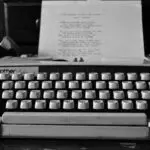
- Pictures of old and new computers (generations)
- Flash cards with classification headings
- A projector or laptop for visuals
- Whiteboard and markers
Rationale for the Lesson
This lesson enables students to understand how computers are grouped by their size, development (generation), and versatility, helping them appreciate the variety and evolution of technology.
Prerequisite/Previous Knowledge
Pupils have been introduced to the meaning and uses of computers in their previous classes and can identify basic computer devices like desktop, laptop, and mobile devices.
Lesson Content/Board Summary
Classification of Computers
Sizes of Computers
Computers can be grouped according to their size and processing capacity. They differ in speed, storage, and physical dimension.
The following are the main sizes of computers:
- Supercomputers – very powerful and large computers used for complex scientific calculations.
- Mainframe Computers – used by large organizations for bulk data processing like banks and insurance companies.
- Minicomputers – medium-sized computers used by small and medium organizations.
- Microcomputers (Personal Computers) – smaller computers used by individuals, such as desktops and laptops.
Generations of Computers
Computers have developed through stages known as generations, each with technological improvements in speed, size, and reliability.
The following are the generations of computers:
- First Generation (1940s–1950s): Used vacuum tubes, very large, and produced much heat.
- Second Generation (1950s–1960s): Used transistors, smaller, faster, and more reliable.
- Third Generation (1960s–1970s): Used integrated circuits (ICs), more compact and efficient.
- Fourth Generation (1970s–Present): Based on microprocessors, very fast and smaller in size.
- Fifth Generation (Present and Future): Based on artificial intelligence (AI) and advanced computing technologies.
Degree of Versatility
Computers can also be classified based on their ability to perform different functions or handle various tasks.
The following are classifications by versatility:
- General-Purpose Computers – can carry out different types of tasks such as word processing, internet browsing, and gaming.
- Special-Purpose Computers – designed to perform a specific task, such as washing machine controllers or traffic light systems.
Teaching Methods/Instructional Techniques:
Discussion, Lecture, Explanation, Demonstration, Group Work, Question and Answer, Visual Aids
Instructional Procedures
To deliver this lesson, the teacher will adopt the following steps:
Step 1: Introduction
Time: 5 minutes
Teaching Skill: Set Induction
Teacher’s Activity: Teacher asks pupils to name different computers they have seen and what they are used for. Teacher links responses to classification of computers.
Pupils’ Activity: Pupils mention examples like laptops, desktops, or ATMs.
Learning Point: Pupils are introduced to computer classification.
Step 2: Sizes of Computers
Time: 10 minutes
Teaching Skill: Explanation
Teacher’s Activity: Teacher explains the sizes of computers with examples and shows relevant charts.
Pupils’ Activity: Pupils observe the charts and listen attentively.
Learning Point: Pupils understand the classification of computers by size.
Step 3: Generations of Computers
Time: 10 minutes
Teaching Skill: Storytelling/Explanation
Teacher’s Activity: Teacher narrates the history of computers through their generations and displays pictures of old and new computers.
Pupils’ Activity: Pupils listen, take notes, and ask questions.
Learning Point: Pupils learn the technological development of computers over time.
Step 4: Degree of Versatility
Time: 8 minutes
Teaching Skill: Discussion
Teacher’s Activity: Teacher explains general-purpose and special-purpose computers with examples from daily life.
Pupils’ Activity: Pupils give examples of computers used at home, school, and banks.
Learning Point: Pupils understand versatility classification of computers.
Step 5: Note-Taking
Time: 5 minutes
Teaching Skill: Explanation
Teacher’s Activity: Teacher dictates or writes the board summary for pupils to copy.
Pupils’ Activity: Pupils copy notes into their exercise books.
Learning Point: Pupils have written notes on the lesson.
Step 6: Evaluation/Review
Time: 5 minutes
Teaching Skill: Questioning
Teacher’s Activity: The teacher evaluates the learning by asking the following questions:
- Mention two sizes of computers with examples.
- State the main features of the first and fourth generation of computers.
- Differentiate between general-purpose and special-purpose computers.
Pupils’ Activity: Pupils respond orally to the questions.
Learning Point: Pupils’ understanding of the lesson is confirmed.
Step 7: Conclusion
Time: 2 minutes
Teaching Skill: Reinforcement
Teacher’s Activity: Teacher summarizes the lesson and emphasizes the importance of knowing the classification of computers.
Pupils’ Activity: Pupils listen attentively.
Learning Point: Pupils appreciate the variety and evolution of computers.
Lesson Keywords
- Supercomputer – the largest and most powerful type of computer.
- Mainframe – a large computer system used for bulk processing.
- Microprocessor – the central processing unit on a single chip.
- Versatility – the ability of a computer to perform different tasks.
- Generation – stages of technological development in computers.
Differentiation
Teacher uses visual aids and simplified explanations for slow learners while advanced learners are encouraged to research more examples and lead group discussions.
Note for teachers using this lesson plan
Ensure examples are relatable to students’ environment. Use visuals or real devices if available to enhance understanding. Stress the importance of classification for appreciating the progress in computer technology.
Community Join the conversation Open discussion +